> For the complete documentation index, see [llms.txt](https://doc.engenius.ai/llms.txt). Markdown versions of documentation pages are available by appending `.md` to page URLs; this page is available as [Markdown](https://doc.engenius.ai/cloud-configuration-guide/topics/authentication-with-microsoft-entra-id-ldap-server/appendix.md).
# Appendix
Content
[01. How to Generate Customized Certificate?](#how-to-generate-customized-certificate)
[02. Supported Operating Systems and Models](#supported-operating-systems-and-models)
[03. Software Architecture](#software-architecture)
## 01. How to Generate Customized Certificate?
Several tools are available to create self-signed certificates. In this tutorial, we will use **OpenSSL** to create a self-signed certificate for secure LDAP.
### **To get started:**
1. **Generate the certificate:**
* Download FreeRADIUS code from .
* Navigate to the directory: **`cd raddb/cert/`**
* Adjust the customized information in the .cnf file (e.g., domain name, expiration duration, location, etc.).
* Run the bootstrap script: **`./bootstrap`**
* Zip the certificate files: **`zip cert.zip server.pem dh ca.pem`**
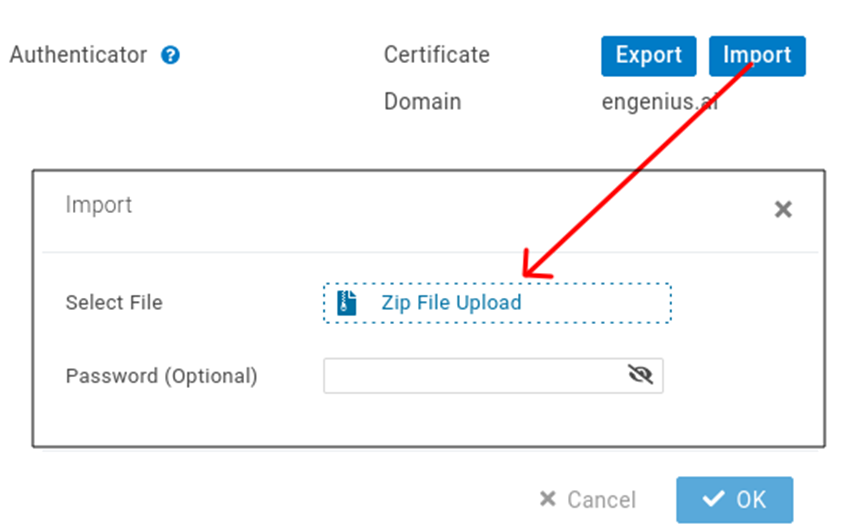
2. Click **Import** and **Zip File Upload** to upload **`cert.zip`** to EnGenius Cloud.
3. Export **`ca.pem`** and install it on the client device if requested.
{% hint style="info" %}
### **Note:**
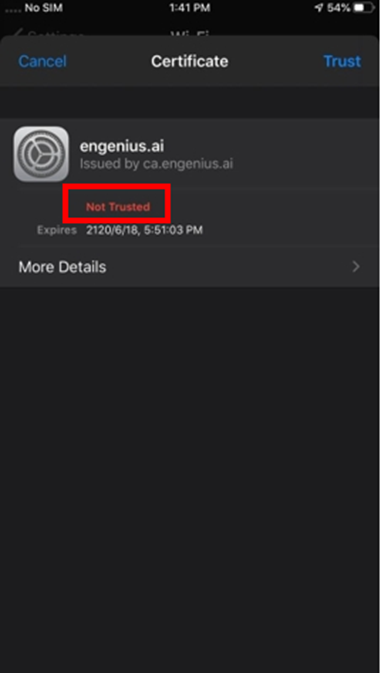
Some browsers might complain about the self-signed certificate and display a "Not Trusted" warning message. If so, the user needs to search for an official Certificate Authority (CA) to apply for a formal CA certificate to avoid the warning message.
{% endhint %}
Example of Configuration for Android
## 02. Supported Operating Systems and Models
**EAP-TTLS/PAP** and **TLS 1.2+** are essential on client devices. The following operating systems have native support and are verified to work with EnGenius Cloud AP:
* iOS version 13 and higher
* Google Chrome OS
* Android version 6 and higher
* Microsoft Windows 8 and higher
* MacOS 11 and higher
### **Verified Client Device List:**
| Manufacturer | Model | Operating System |
| ------------ | --------------------- | ---------------- |
| Apple | iPhone 7 Plus | iOS 13.1.3 |
| Apple | iPhone 11 | IOS 15.4 |
| Apple | iPhone 12 | iOS 14.1 |
| Apple | iPhone XS | IOS 14.6 |
| Apple | MacBook Air (M1,2020) | MacOS 12.3 |
| Apple | iPad Air A1474 (2013) | iOS 12.5.5 |
| Lenovo | IdeaPad Duet CT-X636F | Chrome OS 72 |
| Google | Pixel 3a | Android 11 |
| HP | ProBook 450 G8 | Windows 10 |
| Samsung | S21 | Android 11 |
| Samsung | Note 4 | Android 6.0.1 |
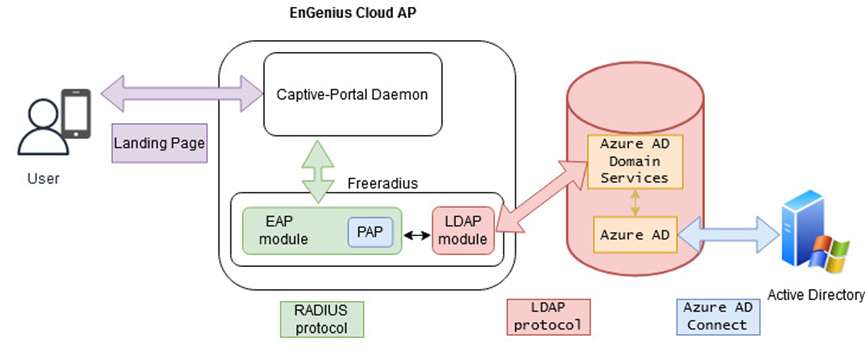
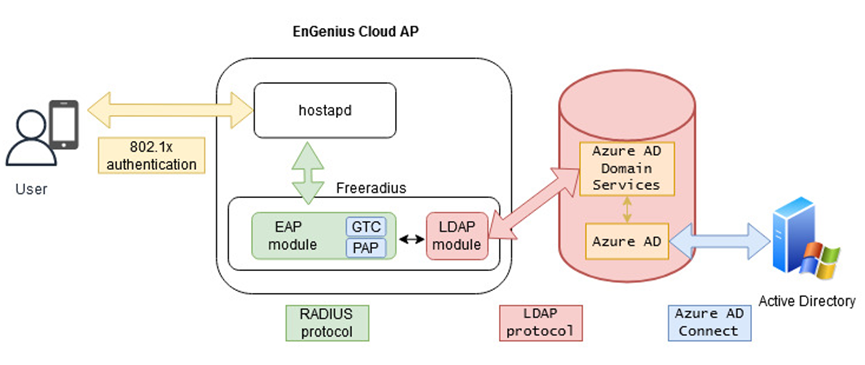
## 03. Software Architecture
### Captive portal with Azure AD Server
### WPA2/WPA3-Enterprise with Azure AD Server
---
# Agent Instructions
This documentation is published with GitBook. GitBook is the documentation platform designed so that both humans and AI agents can read, navigate, and reason over technical content effectively. Learn more at gitbook.com.
## Querying This Documentation
If you need additional information that is not directly available in this page, you can query the documentation by asking a question.
Perform an HTTP GET request on the following URL with the `ask` and `goal` query parameters:
```
GET https://doc.engenius.ai/cloud-configuration-guide/topics/authentication-with-microsoft-entra-id-ldap-server/appendix.md?ask=&goal=
```
`ask` is the immediate question: it should be specific, self-contained, and written in natural language.
`goal` is what the user is ultimately trying to achieve, the reason they need the answer. Sharing it helps GitBook give you a better, more relevant answer. A goal is most helpful when it describes the outcome the user wants rather than restating the question. For example, with `ask=how do I create an API token`, a goal like `automate deployments from our CI pipeline` lets GitBook tailor the answer to that use case.
The response will contain a direct answer to the question and relevant excerpts and sources from the documentation.
Use this mechanism when the answer is not explicitly present in the current page, you need clarification or additional context, or you want to retrieve related documentation sections.