# Applications

## Chapter 17.3: Configuring Mail and File Servers

Learn how to integrate EDCC with essential external services, including your email server and a file server.

> 🔐 **Organization Administrator Only**
>
> * **Required Role**: Organization Admin only
> * **Access Level**: Complete EDCC platform administration
> * **Restriction**: POD Admin and Viewers cannot access this section
> * **Purpose**: SMTP and file server configuration for system operations

***

## Overview: Integrating EDCC with Your IT Ecosystem

The **`System > Application Settings`** page is where you connect the EDCC platform to your broader IT ecosystem. Properly setting up these services is a prerequisite for unlocking some of EDCC's most powerful automation and collaboration features.

This page allows an Organization-level Admin to configure two critical integrations:

* **Mail Server (SMTP)**: To enable all email-based communication.
* **HTTPS File Server**: To enable remote OS installation capabilities.

***

### Task 1: Configuring the Mail Server (SMTP)

&#x20;**Enabling Proactive Communication**

This section allows you to connect EDCC to your organization's SMTP server. Configuring this transforms EDCC from a passive tool that you must actively check into a proactive communication hub that pushes critical information to you and your team.

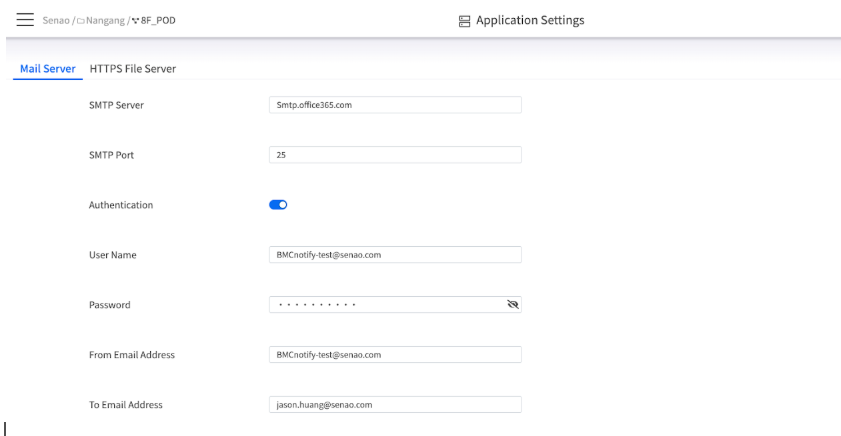
<figure><img src="https://content.gitbook.com/content/iGPGTG6LFrVfBRB76ZPF/blobs/6OqlhMrtjKbExvRZreMW/image.png" alt=""><figcaption><p><mark style="background-color:$info;">The Mail Server configuration interface.</mark></p></figcaption></figure>

#### **Why This is a Critical Feature**

Without a configured mail server, all system notifications are confined to the UI's notification center (the bell icon). Integrating an SMTP server enables proactive and automated communication for these essential features:

<table><thead><tr><th width="163.3671875">Feature</th><th width="385.9921875">Purpose</th><th>Business Impact</th></tr></thead><tbody><tr><td><strong>Team Member Invitations</strong></td><td>This is the only way to add new users to the EDCC platform. The invitation system relies entirely on email to send access links to new team members.</td><td><strong>Essential for user management</strong></td></tr><tr><td><strong>Proactive Event Notifications</strong></td><td>You can receive immediate email alerts for important system events (e.g., critical hardware failures). This allows you to respond to problems quickly, even when you are not actively monitoring the dashboard.</td><td><strong>Reduces response time to critical issues</strong></td></tr><tr><td><strong>Automated Maintenance Updates</strong></td><td>EDCC can automatically notify you when a scheduled task, such as a firmware update for a POD, has been completed, providing a convenient audit trail.</td><td><strong>Improves maintenance transparency</strong></td></tr></tbody></table>

#### **SMTP Configuration Explained**

<table><thead><tr><th width="194.3671875">Field</th><th>Description &#x26; Why It Matters</th></tr></thead><tbody><tr><td><strong>SMTP Server / Port</strong></td><td>The address and port of your mail server (e.g., smtp.office365.com and port 587). <strong>Why it matters</strong>: These must be correct for EDCC to establish a connection with your email infrastructure.</td></tr><tr><td><strong>Authentication</strong></td><td>A toggle to enable SMTP authentication. <strong>Why it matters</strong>: Most modern mail services require a valid username and password to prevent unauthorized use. This should almost always be enabled.</td></tr><tr><td><strong>User Name / Password</strong></td><td>The credentials for the SMTP account. <strong>Why it matters</strong>: It is best practice to use a dedicated service account for this purpose.</td></tr><tr><td><strong>From Email Address</strong></td><td>The email address that EDCC will use as the sender (e.g., noreply-edcc@yourcompany.com). <strong>Why it matters</strong>: This affects how recipients see the email and may be important for email filtering rules.</td></tr><tr><td><strong>To Email Address</strong></td><td>The default recipient email address for system notifications (e.g., it-alerts@yourcompany.com). <strong>Why it matters</strong>: This ensures that critical alerts are sent to the correct team distribution list.</td></tr></tbody></table>

#### **The Recommended Workflow: Test Before You Apply**

**Step-by-Step Process**:

1. Fill in all the required server and credential details
2. Click the **Test** button. EDCC will attempt to send a test email to confirm the settings are correct
3. Once the test is successful, click **Apply** to save the configuration permanently

{% hint style="success" %}
**Best Practice: Always Test First**

Always use the **Test** button to confirm your settings are correct before applying them. This prevents misconfigurations that could disrupt notification delivery.
{% endhint %}

***

### Task 2: Configuring the HTTPS File Server

**Enabling Remote OS Deployment**

This section allows you to enable a secure, internal file-sharing service within the EDCC platform. Activating this is the cornerstone of EDCC's bare-metal provisioning and remote maintenance capabilities, turning your OS Repository into a functional, network-accessible library.

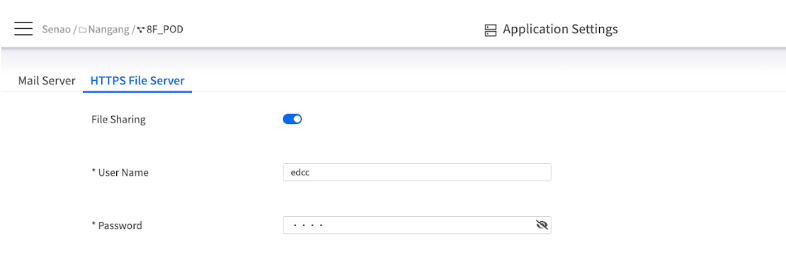
<figure><img src="https://content.gitbook.com/content/iGPGTG6LFrVfBRB76ZPF/blobs/hYdSKgTBygR2xQfFM1qX/image.png" alt=""><figcaption><p><mark style="background-color:$info;">The HTTPS File Server configuration interface.</mark></p></figcaption></figure>

#### **Why This is a Critical Feature**

The primary purpose of the HTTPS File Server is to enable **Remote OS Installation**. It provides the essential mechanism for EnGenius nodes to access and mount bootable ISO files from the OS Deployment repository. This allows you to perform clean OS installations on new nodes or re-image existing ones entirely remotely, eliminating the need for physical media like USB drives and ensuring a consistent, scalable server deployment process.

#### **HTTPS File Server Configuration Explained**

<table><thead><tr><th width="132.68359375">Field</th><th>Description &#x26; Why It Matters</th></tr></thead><tbody><tr><td><strong>File Sharing</strong></td><td>The master toggle to enable or disable the HTTPS File Server. <strong>Why it matters</strong>: This service must be enabled for the <strong>Mount ISO Image</strong> operation to work. If it's disabled, all remote OS deployments will fail.</td></tr><tr><td><strong>User Name / Password</strong></td><td>The credentials required to access the file server. <strong>Why it matters</strong>: The nodes' BMCs will use these credentials to authenticate and access the ISO files. Setting a strong, unique password here protects your OS images from unauthorized access.</td></tr></tbody></table>

**Configuration Process**: After enabling the service and setting the credentials, click **Apply** to activate the file server.

***

### Integration Dependencies and Impact

#### **Feature Dependency Matrix**

<table><thead><tr><th>EDCC Feature</th><th width="162.03515625">SMTP Required</th><th width="174.125">File Server Required</th><th>Impact if Not Configured</th></tr></thead><tbody><tr><td><strong>Team Member Management</strong></td><td>Yes</td><td>No</td><td>Cannot invite new users</td></tr><tr><td><strong>System Notifications</strong></td><td>Yes</td><td>No</td><td>No email alerts for critical events</td></tr><tr><td><strong>OS Deployment</strong></td><td>No</td><td>Yes</td><td>Cannot mount ISO images remotely</td></tr><tr><td><strong>Firmware Updates</strong></td><td>Recommended</td><td>No</td><td>No completion notifications</td></tr><tr><td><strong>Maintenance Reports</strong></td><td>Recommended</td><td>No</td><td>No automated status updates</td></tr></tbody></table>

#### **Security Considerations**

**SMTP Security**:

* **Dedicated Service Account**: Use a dedicated email account for EDCC, not personal accounts
* **Limited Permissions**: Service account should only have send permissions
* **Authentication**: Always enable SMTP authentication for security
* **Monitoring**: Monitor email activity for unusual patterns

**File Server Security**:

* **Strong Credentials**: Use complex passwords for file server access
* **Network Isolation**: Consider network segmentation for file server access
* **Access Logging**: Monitor file server access patterns
* **Content Validation**: Only upload verified, scanned ISO images

#### **Troubleshooting Common Issues**

**SMTP Configuration Problems**:

* **Test Email Fails**: Verify server address, port, and credentials
* **Authentication Errors**: Confirm username/password and authentication method
* **Firewall Issues**: Ensure SMTP ports are open in network firewalls
* **Email Delivery Problems**: Check spam filters and email routing rules

**File Server Configuration Problems**:

* **Mount ISO Fails**: Verify file server is enabled and running
* **Authentication Errors**: Check BMC credentials and file server password
* **Network Connectivity**: Ensure nodes can reach EDCC file server
* **File Access Issues**: Verify ISO files are properly uploaded and accessible

***

## Chapter Summary & Key Takeaways

* **SMTP is Required for Users & Alerts**: You cannot invite new team members or receive email notifications without a correctly configured Mail Server
* **HTTPS is Required for OS Deployment**: You cannot use the **Mount ISO Image** feature without enabling the HTTPS File Server
* **Always Test SMTP**: Use the **Test** button to validate your mail server settings before saving them
* **Admin-Only**: These settings are foundational and can only be configured by an Organization-level Admin
* **Security First**: Use dedicated service accounts and strong passwords for both integrations
* **Test Dependencies**: Verify both services work correctly before relying on dependent features

**What's Next**: Chapter 17.4 will explore Backup and Restore capabilities, where you'll learn to protect and recover your EDCC platform configuration and data.

> 💡 **Pro Tip**: Configure these integrations during initial EDCC deployment - many core features depend on them, and retrofitting can disrupt established workflows.