> For the complete documentation index, see [llms.txt](https://doc.engenius.ai/llms.txt). Markdown versions of documentation pages are available by appending `.md` to page URLs; this page is available as [Markdown](https://doc.engenius.ai/engenius-ds/jp/engenius-cloud-ds/cloud-indoor-wireless/ecw526.md).

# ECW526

クラウド管理型 Wi-Fi 7 2×2×2 屋内 用アクセスポイント

<figure><img src="https://content.gitbook.com/content/vSG3Mp8aTAsL6d8Bh6nR/blobs/6FTfJpKZfvJ0FizCtqTu/Single%20DS%20Cover-Cloud%20Indoor%20AP%20.svg" alt=""><figcaption></figcaption></figure>

## <mark style="color:$primary;">概要</mark>

{% columns %}
{% column width="50%" %}
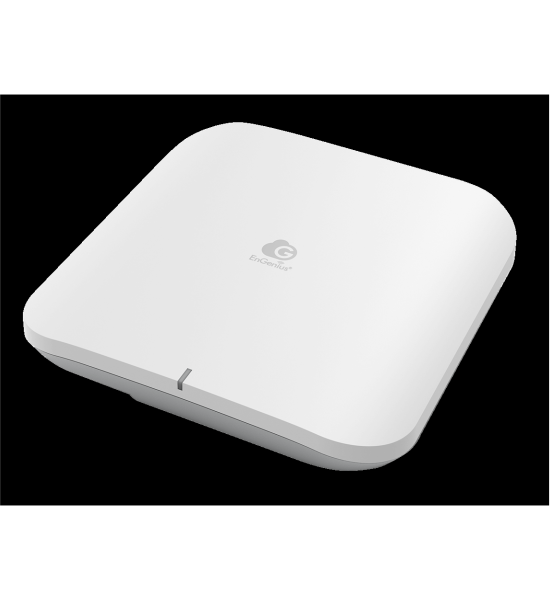
ECW526 は、トライコンカレント対応 Wi-Fi 7(IEEE 802.11be)準拠モデルです。6GHz 帯最大5,800Mbps、5GHz 帯最大 2,900Mbps、2.4GHz 帯最大 700Mbps 高速無線通信を実現します。

WPA3/WPA2-AES 認証に対応し、リモート監視およびトラブルシューティングが可能です。メッシュワイヤレス機能により通信品質を最適化します。\
EnGenius Cloudアプリにより、複数のアクセスポイントを容易に導入・一元管理できます。
{% endcolumn %}

{% column width="50%" %}

<figure><img src="https://content.gitbook.com/content/vSG3Mp8aTAsL6d8Bh6nR/blobs/9DGOy3QrWAz2k3hJo7aP/ECW526%20DS.svg" alt=""><figcaption></figcaption></figure>
{% endcolumn %}
{% endcolumns %}

## <mark style="color:$primary;">特長・メリット</mark>

{% columns %}
{% column %}

* トライコンカレント対応 IEEE802.11be(Wi-Fi 7)アーキテクチャを採用し、下位互換性を確保
* 6GHz 帯で最大 5,800Mbps、5GHz 帯で最大 2,900Mbps、2.4GHz 帯で最大700Mbps の高速通信を実現
* 10GbE インターフェースにより高スループットを実現し、IEEE 802.3at および60W PoE インジェクター入力に対応、最大 100m(328 フィート)まで柔軟な設置が可能
* WPA3 および WPA2-AES 認証方式に対応
  {% endcolumn %}

{% column %}

* APモードおよびメッシュモードに対応したクラウド管理
* クイックスキャンによるデバイス登録および設定、リモート監視・トラブルシューティングに対応
* EnGenius Cloud アプリにより、場所を問わず多数のアクセスポイントを一元管理可能
* メッシュワイヤレス機能により、導入を簡素化し、電波状況の最適化および自己回復を実現
  {% endcolumn %}
  {% endcolumns %}

***

<figure><img src="https://content.gitbook.com/content/vSG3Mp8aTAsL6d8Bh6nR/blobs/bDhQxZSrgge11g3y0lpz/%E6%9C%AA%E5%91%BD%E5%90%8D%E8%A8%AD%E8%A8%88.svg" alt=""><figcaption></figcaption></figure>

## <mark style="color:$primary;">技術仕様</mark>

<table><thead><tr><th width="202">Technical Specifications</th><th></th></tr></thead><tbody><tr><td>Standards</td><td>IEEE 802.11be on 2.4 GHz<br>IEEE 802.11be on 5 GHz<br>IEEE 802.11be on 6 GHz<br>Backward compatible with 802.11a/b/g/n/ac/ax<br>IEEE 802.3 u/ab</td></tr><tr><td>Antenna</td><td>2 x 2.4 GHz: 5 dBi(Integrated Omni-Directional)<br>2 x 5 GHz: 6 dBi(Integrated Omni-Directional)<br>2 x 6 GHz: 6 dBi(Integrated Omni-Directional)</td></tr><tr><td>Scanning Radio</td><td>N/A</td></tr><tr><td>BLE</td><td>N/A</td></tr><tr><td>Physical Interfaces</td><td>1 x 10GE Port (PoE+)<br>1 x DC Jack<br>1 x Reset Button</td></tr><tr><td>LED Indicators​</td><td>1 x Multi-color LED</td></tr><tr><td>Power Source</td><td>Power-over-Ethernet: 802.3at Input<br>12VDC /2A Power Adapter</td></tr><tr><td>Maximum Power Consumption</td><td>21W</td></tr></tbody></table>

<table><thead><tr><th width="202">Wireless &#x26; Radio Specifications</th><th></th></tr></thead><tbody><tr><td>Operating Frequency</td><td>Tri-Radio Concurrent 2.4 GHz &#x26; 5 GHz &#x26; 6GHz</td></tr><tr><td>Operation Modes</td><td>Managed mode: AP, AP Mesh, Mesh</td></tr><tr><td>Frequency Radio</td><td>2.4 GHz: 2400 MHz ~ 2482 MHz<br>5 GHz: 5150 MHz ~ 5250 MHz, 5250 MHz ~ 5350 MHz, 5470 MHz ~ 5725 MHz, 5725 MHz ~ 5850 MHz<br>6GHz: 5925-7125MHz</td></tr><tr><td>Transmit Power</td><td>Up to 23 dBm on 2.4 GHz<br>Up to 22 dBm on 5 GHz<br>Up to 22 dBm on 6 GHz<br>(Maximum power is limited by regulatory domain)</td></tr><tr><td>Radio Chains</td><td>2 × 2:2</td></tr><tr><td>SU-MIMO Capability</td><td>Two(2) spatial stream Single User (SU) MIMO for up to 700 Mbps wireless data rate with VHT40 bandwidth to a 2x2 wireless device under the 2.4GHz radio.<br>Two(2) spatial stream Single User (SU) MIMO for up to 2,900 Mbps wireless data rate with HE160 to a 2x2 wireless device under the 5GHz radio.<br>Two(2) spatial stream Single User (SU) MIMO for up to 5,800 Mbps wireless data rate with EHT320 to a 2x2 wireless device under the 6GHz radio.</td></tr><tr><td>MU-MIMO Capability</td><td>Two(2) spatial stream MU-MIMO for up to 700 Mbps wireless data rate with VHT40 bandwidth to a 2x2 wireless device under the 2.4GHz radio.<br>Two(2) spatial stream MU-MIMO for up to 2,900 Mbps wireless data rate with HE160 to a 2x2 wireless device under the 5GHz radio simultaneously.<br>Two(2) spatial stream MU-MIMO for up to 5,800 Mbps wireless data rate with EHT320 to a 2x2 wireless device under the 6GHz radio simultaneously.</td></tr><tr><td>Supported Data Rates</td><td>802.11be:<br>2.4 GHz: Max 700 (MCS0 to MCS13, NSS = 1 to 2)<br>5 GHz: Max 2,900 (MCS0 to MCS13, NSS = 1 to 2)<br>6 GHZ: Max 5,800 (MCS0 to MCS13, NSS = 1 to 2)<br>802.11ax:<br>2.4 GHz: 9 to 574 (MCS0 to MCS11, NSS = 1 to 2)<br>5 GHz: 18 to 2,400 (MCS0 to MCS11, NSS = 1 to 2)<br>6 GHZ: 18 to 2,400 (MCS0 to MCS11, NSS = 1 to 2)<br>802.11b: 1, 2, 5.5, 11<br>802.11a/g: 6, 9, 12, 18, 36, 48, 54<br>802.11n: 6.5 to 600 (MCS0 to MCS31)<br>802.11ac: 6.5 to 1,733 (MCS0 to MCS9, NSS = 1 to 2)</td></tr><tr><td>Supported Radio Technologies</td><td>802.11be/ax: Orthogonal Frequency Division Multiple Access(OFDMA)<br>802.11a/g/n/ac: Orthogonal Frequency Division Multiple (OFDM)<br>802.11b: Direct-sequence spread-spectrum (DSSS)</td></tr><tr><td>Channelization</td><td>802.11be supports extreme high efficiency (EHT) —EHT 20/40/80/160/320 MHz<br>802.11ax supports high efficiency throughput (HE) —HE 20/40/80/160 MHz<br>802.11ac supports very high throughput (VHT) —VHT 20/40/80 MHz<br>802.11n supports high throughput (HT) —HT 20/40 MHz<br>802.11n supports high throughput under the 2.4GHz radio –HT40 MHz (256-<br>QAM)<br>802.11n/ac/ax packet aggregation: A-MPDU, A-SPDU</td></tr><tr><td>Supported Modulation</td><td>802.11be: BPSK, QPSK, 16-QAM, 64-QAM, 256-QAM, 1024-QAM, 4096-QAM<br>802.11ax: BPSK, QPSK, 16-QAM, 64-QAM, 256-QAM, 1024-QAM<br>802.11ac: BPSK, QPSK, 16-QAM, 64-QAM, 256-QAM<br>802.11a/g/n: BPSK, QPSK, 16-QAM, 64-QAM<br>802.11b: BPSK, QPSK, CCK</td></tr><tr><td>DFS Certification</td><td>FCC/CE/IC</td></tr><tr><td>AirGuard (WIPS/WIDS)</td><td>N/A</td></tr><tr><td>Zero-wait DFS</td><td>N/A</td></tr><tr><td>Dedicated Scanning Radio</td><td>N/A</td></tr><tr><td>Max Concurrent User</td><td>512</td></tr><tr><td>Client Balancing</td><td>Yes</td></tr><tr><td>Auto Channel Selection</td><td>Yes</td></tr></tbody></table>

<table><thead><tr><th width="202">Management Features</th><th></th></tr></thead><tbody><tr><td>Multiple BSSID</td><td>8 SSIDs on both 2.4GHz, 5GHz and 6GHz bands</td></tr><tr><td>VLAN Tagging</td><td>Supports 802.1q SSID-to-VLAN Tagging<br>Cross-Band VLAN Pass-Through<br>Management VLAN</td></tr><tr><td>Spanning Tree</td><td>Supports 802.1d Spanning Tree Protocol</td></tr><tr><td>QoS (Quality of Service)</td><td>Compliance With IEEE 802.11e Standard<br>WMM</td></tr><tr><td>SNMP</td><td>v1, v2c, v3</td></tr><tr><td>MIB</td><td>I/II, Private MIB</td></tr><tr><td>Fast Roaming</td><td>802.11r/k</td></tr><tr><td>Wireless Security</td><td>WPA2-PSK<br>WPA2-Enterprise<br>WPA3-PSK<br>WPA3-Enterprise<br>Hide SSID in Beacons<br>Wireless STA (Client) Connected List<br>Client Isolation<br>Client Access Control</td></tr><tr><td>Interface</td><td>IPv4, IPv6</td></tr><tr><td>Local Web Access</td><td>Supports HTTP or HTTPS</td></tr></tbody></table>

<table><thead><tr><th width="202">Environmental &#x26; Physical</th><th></th></tr></thead><tbody><tr><td>Temperature Range</td><td>Operating: 32ºF~122ºF (0 ºC~50 ºC)<br>Storage: -40 ºF~176 ºF (-40 ºC~80 ºC)</td></tr><tr><td>Humidity (non-condensing)</td><td>Operating: 90% or less<br>Storage: 90% or less</td></tr><tr><td>IP Rating(Outdoor only)</td><td>N/A</td></tr><tr><td>Surge Protection (Outdoor only)</td><td>N/A</td></tr><tr><td>ESD Protection(Outdoor only)</td><td>N/A</td></tr><tr><td>Weight</td><td>720g</td></tr><tr><td>Dimensions</td><td>Width: 190 mm<br>Length: 190 mm<br>Height: 39.5mm</td></tr><tr><td>Package Contents</td><td>1 – ECW526 Cloud Managed Indoor Access Point<br>1 – Ceiling Mount Base<br>1 – Ceiling and Wall Mount Screw Kit<br>1 – T-rail Mount kit<br>1 – Product Card</td></tr></tbody></table>

<table><thead><tr><th width="202">Compliance</th><th></th></tr></thead><tbody><tr><td>Regulatory Compliance</td><td>FCC<br>CE<br>IC<br>UKCA<br>VCCI<br>AU</td></tr></tbody></table>

***

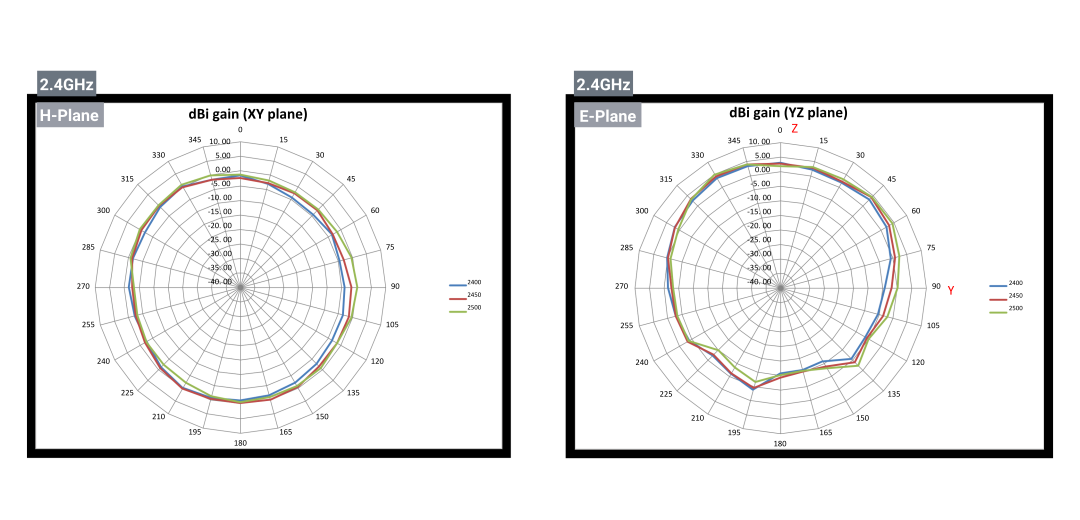
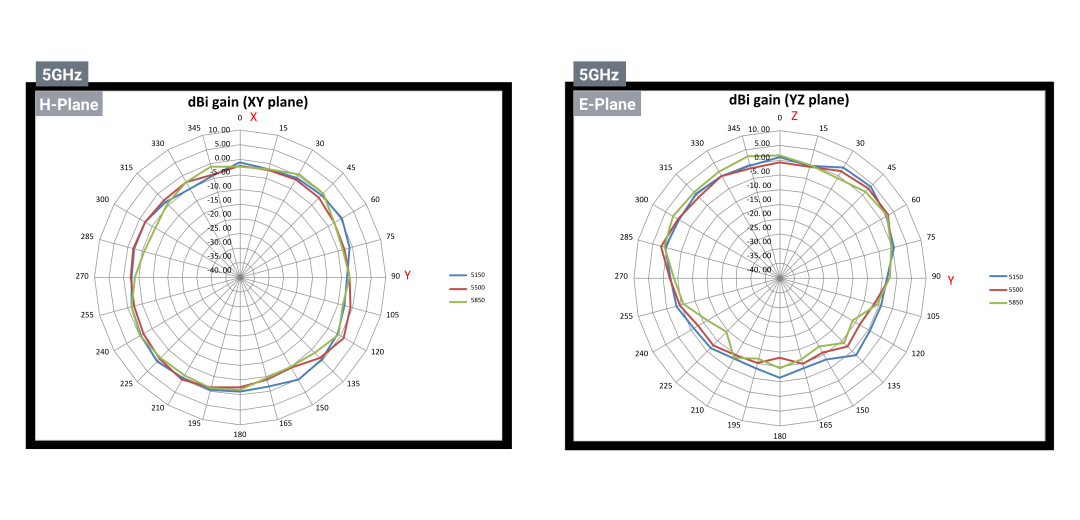
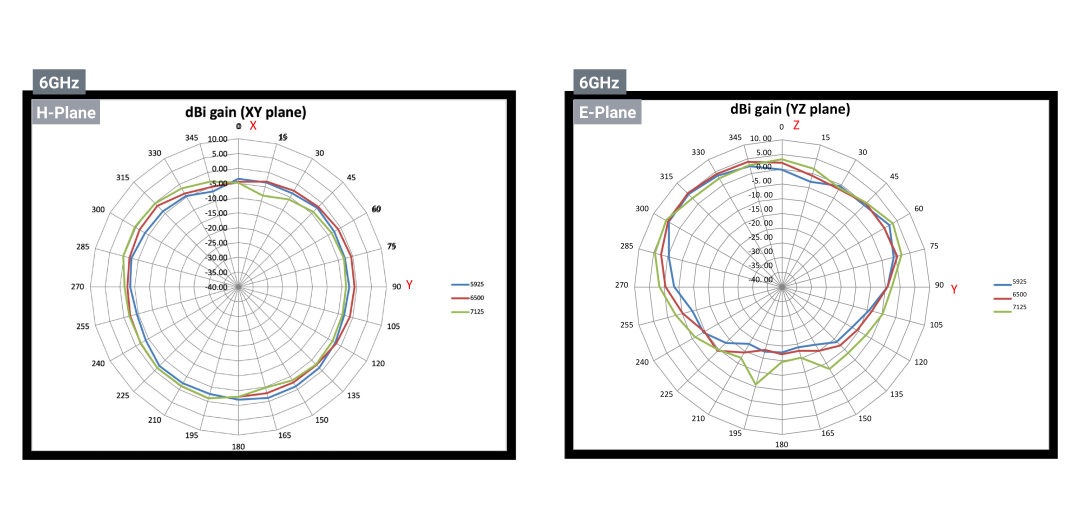
## <mark style="color:$primary;">アンテナパターン</mark>

<figure><img src="https://content.gitbook.com/content/vSG3Mp8aTAsL6d8Bh6nR/blobs/G5vRIUxDNjwUF9uAOrGy/Antennas%20Patterns%20-ECW526-1.svg" alt=""><figcaption></figcaption></figure>

<figure><img src="https://content.gitbook.com/content/vSG3Mp8aTAsL6d8Bh6nR/blobs/mpqGuLGTobOb3hl914dB/Antennas%20Patterns%20-ECW526-2.svg" alt=""><figcaption></figcaption></figure>

<figure><img src="https://content.gitbook.com/content/vSG3Mp8aTAsL6d8Bh6nR/blobs/xMWEN5aETTmEGjoyhKEP/Antennas%20Patterns%20-ECW526-3.svg" alt=""><figcaption></figcaption></figure>

## <mark style="color:$primary;">ハードウェア概要</mark>

<figure><img src="https://3191404941-files.gitbook.io/~/files/v0/b/gitbook-x-prod.appspot.com/o/spaces%2FvSG3Mp8aTAsL6d8Bh6nR%2Fuploads%2FIZMJ0gkRmqYEwee0Yptz%2FECW526-JP1.png?alt=media&amp;token=1527b40a-ef77-4e41-aa02-55fd9718c1bd" alt=""><figcaption></figcaption></figure>

> <sup><sub>本製品の仕様および機能は、予告なく変更される場合があります。記載されている商標および登録商標は、各権利者に帰属します。本製品は、住宅環境における電波障害防止を目的とした基準に基づいて設計されていますが、設置方法や使用状況によっては、無線通信に有害な干渉を生じる場合があります。住宅地域で電波干渉が発生した場合、その是正は使用者の責任および費用負担にて行っていただく必要があります。監視機器の設置および運用にあたっては、映像・音声の監視および個人情報・プライバシーに関する関連法令(国および地方自治体の法令を含む)を遵守してください。Version 1.4 01/30/2026<sub></sup>
>
> <p align="right"><img src="https://content.gitbook.com/content/vSG3Mp8aTAsL6d8Bh6nR/blobs/aAL68fGVorWXU3FbVkzg/EnGenius%20logo-57_w_114px%20(1).png" alt="" data-size="line"></p>

<details>

<summary><a href="https://www.engeniustech.com/jp/contact-us" class="button primary">Contact Us</a></summary>

<div align="left"><figure><img src="https://content.gitbook.com/content/vSG3Mp8aTAsL6d8Bh6nR/blobs/PkDY2XZGSgFcIbAjBsCe/DS%20Footer%20QR%20Code.png" alt="" width="138"><figcaption></figcaption></figure></div>

</details>

{% hint style="warning" %} <sub>本ドキュメントはオンライン版です。正式な印刷用 PDF については、EnGenius が別途提供するものを正本とします。</sub>
{% endhint %}


---

# Agent Instructions
This documentation is published with GitBook. GitBook is the documentation platform designed so that both humans and AI agents can read, navigate, and reason over technical content effectively. Learn more at gitbook.com.

## Querying This Documentation
If you need additional information that is not directly available in this page, you can query the documentation by asking a question.

Perform an HTTP GET request on the following URL with the `ask` and `goal` query parameters:

```
GET https://doc.engenius.ai/engenius-ds/jp/engenius-cloud-ds/cloud-indoor-wireless/ecw526.md?ask=<question>&goal=<user_goal>
```

`ask` is the immediate question: it should be specific, self-contained, and written in natural language.
`goal` is what the user is ultimately trying to achieve, the reason they need the answer. Sharing it helps GitBook give you a better, more relevant answer. A goal is most helpful when it describes the outcome the user wants rather than restating the question. For example, with `ask=how do I create an API token`, a goal like `automate deployments from our CI pipeline` lets GitBook tailor the answer to that use case.

The response will contain a direct answer to the question and relevant excerpts and sources from the documentation.

Use this mechanism when the answer is not explicitly present in the current page, you need clarification or additional context, or you want to retrieve related documentation sections.