> For the complete documentation index, see [llms.txt](https://doc.engenius.ai/llms.txt). Markdown versions of documentation pages are available by appending `.md` to page URLs; this page is available as [Markdown](https://doc.engenius.ai/home-engenius-qsg-library/engenius-fit-qsg/fit-access-point/ews276-fit.md).
# EWS276-FIT
EnGenius Fit 802.11ax 4×4 Dual Band Managed Indoor Wireless Access Point (EWS276-FIT)
## Introduction
This Quick Start Guide is designed to guide you through the installation of the **Fit6 4x4 Lite** access point, model **EWS276-FIT**, including hardware mounting and configuration.
{% hint style="info" %}
## Fit6 4x4 Lite
### EnGenius Fit 802.11ax 4×4 Dual Band Managed Indoor Wireless Access Point
#### **Model:** EWS276-FIT
* Wi-Fi 6 technology for high-performance Wi-Fi in high-density, multi-device environments.
* Four spatial streams support up to 2,400 Mbps (5GHz) & 1,200 Mbps (2.4GHz).
* Multiple applications for cloud and on premises solutions
{% endhint %}
Content Quick Links
[**Hardware Mounting**](#hardware-mounting)
[**Powering the EnGenius Fit AP**](#powering-the-engenius-fit-ap)
[**Management Plane**](#management-plane)
[**Option A: Cloud Management**](#option-a-cloud-management-with-fitxpress)
[**Option B: On-Premises Management**](#cloud-managed-with-fit-cloud)
[**Option C: Standalone Configuration**](#cloud-managed-with-fit-cloud-1)
## Package Contents
## System Requirements
#### **Web Browser**
* Google Chrome (57.0.2987.110 and later)
* Microsoft Edge (80.0.361.103 and later)
* Mozilla Firefox (52.0 and later)
## Hardware Overview
#### Ports
{% hint style="info" %}
#### **Reset Button:**
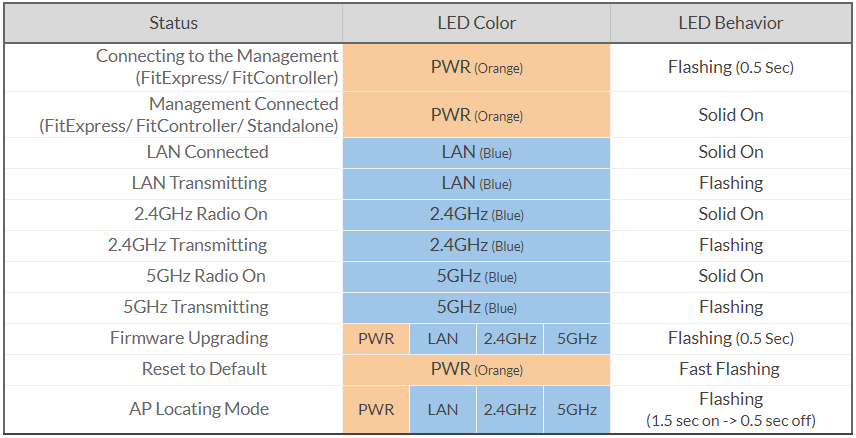
* **Reset to default**: Press and hold the reset button for over **10** seconds, and the **LED (PWR)** will start *Fast Flashing* (0.2 sec). Then, the device will be reset to factory default settings.
{% endhint %}
#### LEDs
## Hardware Mounting
The access point can be mounted on the **Ceiling** and **Wall.** Please perform the following steps to install successfully.
#### Ceiling Mount
> #### T-Rail
1. Slide the **Ceiling Mount Base** into the designated slot on the access point slot of the Access Point.
2\. Slightly hook the ceiling mount bracket onto the T-Rail until you hear a click.
> #### Hard Ceiling
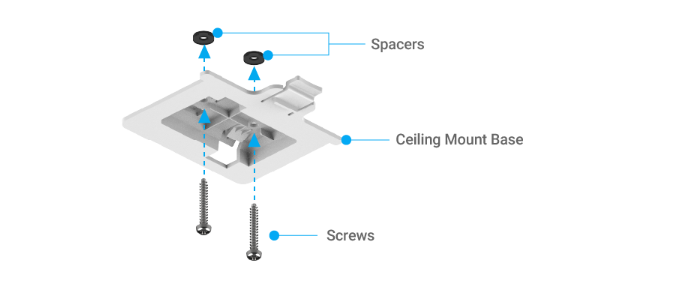
1. Screw the included **Screws** into the **Ceiling Mount Base** with **Spacers**, and then screw the **Screws** into the surface until they are flush with the surface.
2\. Slide the Access Point into the **Ceiling Mount Base**.
### Wall Mount
1. Determine where the **Access Point** will be placed and mark the location on the surface for the two mounting holes. Use the appropriate drill bit to drill two 8.1mm diagram and 26mm-deep holes on the marks.
2. Screw the **Anchors** into the holes until they are flush with the wall; screw the included **Screws** into the **Anchors** but leave the screw head sticking out so you can hang the **Access Point** on it.
3\. Hang the **Access Point** against the wall onto the **Screw** heads.
## **Powering the EnGenius Fit AP**
EnGenius Fit AP devices can be powered by any of the following:
* EnGenius Fit PoE switches or 802.3af/ 802.3at PoE+ compliant switches
* EnGenius PoE adaptor (EPA5006GP/EPA5006GAT)
* Power Adapter (12V/2A power input)
{% hint style="danger" %}
Caution: Do not use both power sources at the same time.
{% endhint %}
### **Connecting to a PoE Switch**
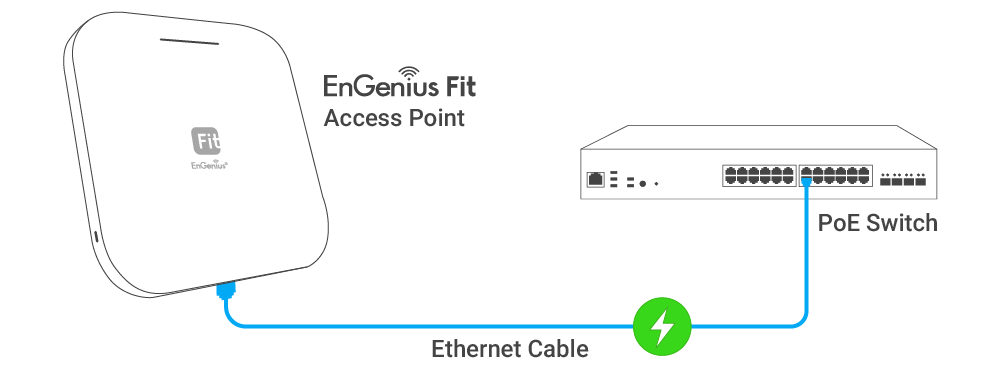
Connect the Ethernet cable from the EnGenius Fit AP directly to the PoE port of the PoE switch.
AP is powered by a PoE Switch.
### **Powering with a PoE Adapter**
(A) Connect one end of the Ethernet cable into the LAN (PoE) port of EnGenius FIT AP and the other end to the PoE port on the PoE Adapter.
(B) Connect the power cord with the PoE Adapter and plug the other end into an electrical outlet. (C) Connect the second Ethernet cable into the LAN port of the PoE Adapter and the other end to the Ethernet port on the computer.
{% hint style="info" %}
Please make sure to use cat5/cat5e UTP/STP RJ45 Ethernet cables.
{% endhint %}
AP is powered by a PoE adaptor.
### **Powering with a Power Adapter**
Connect the Power Cord to the adapter, and then plug the Power Cord into the power outlet.
AP is powered by a power adapter
## Management Plane
EnGenius Fit provides flexible options to manage your devices based on your network planning and deployment.
Option A: **Cloud Management**
Option B: **On-Premises Management**
Option C: **Standalone Configuration**
### **Cloud Management**
Manage and monitor the Access Point through the **FitXpress Platform** with a mobile app or through the web portal.
**FitXpress App** (iOS/ Android)
:arrow\_down: [Download the FitXpress mobile app here](https://qr.engenius.ai/app/fitcloud)
Scan to download FitXpress app
### **On-Premises Management**
If you want to manage the device in on-premises mode, you need an onsite management station running the **FitController** connected to the same Layer 2 network.
{% hint style="success" %}
**FitController**
FitController is a custom-built appliance with optimized network management software installed to ease onsite deployment without manual server configurations.
{% endhint %}
### **Standalone Configuration**
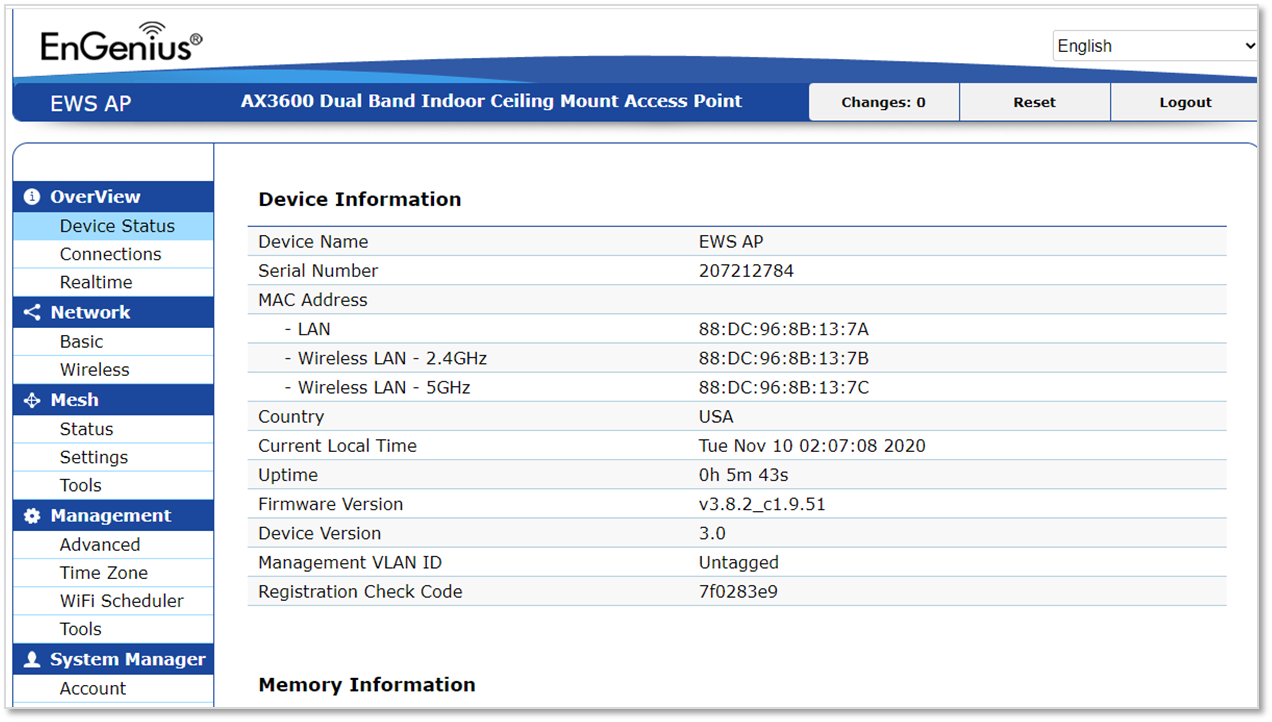
Using your computer, you can connect to the same network (subnet) as the Access Point and use the web browser to access the device's local web GUI page for configurations whenever the device is set to **Standalone mode.**
## **Option A: Cloud Management with FitXpress**
### **Step 1: Connecting Ethernet**
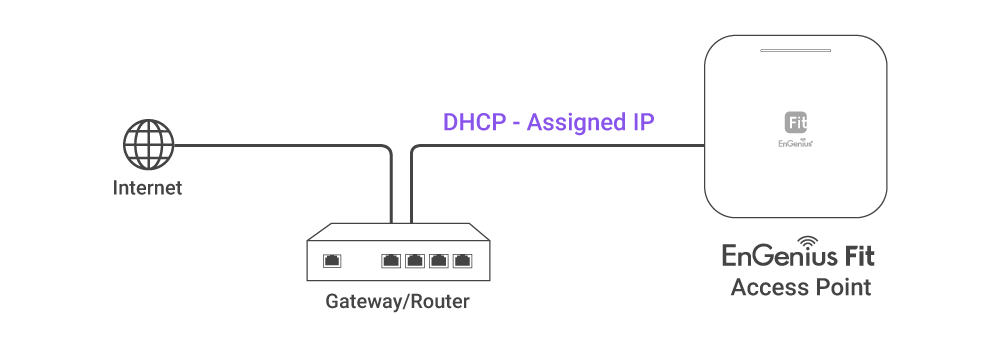
Connect the Ethernet cable from the EnGenius Fit AP directly to the DHCP-enabled network and make sure the AP can reach the Internet.
### **Step 2: Register Device**
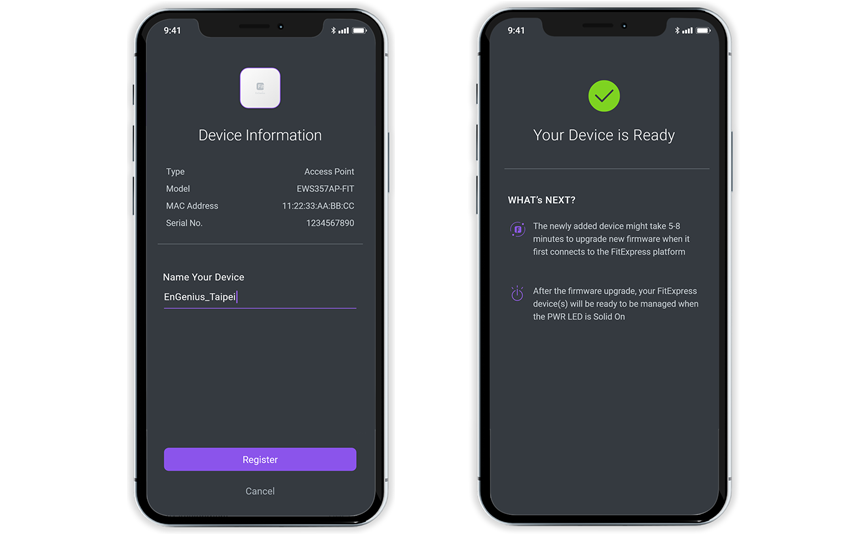
You can register the access point with the **FitXpress app.**
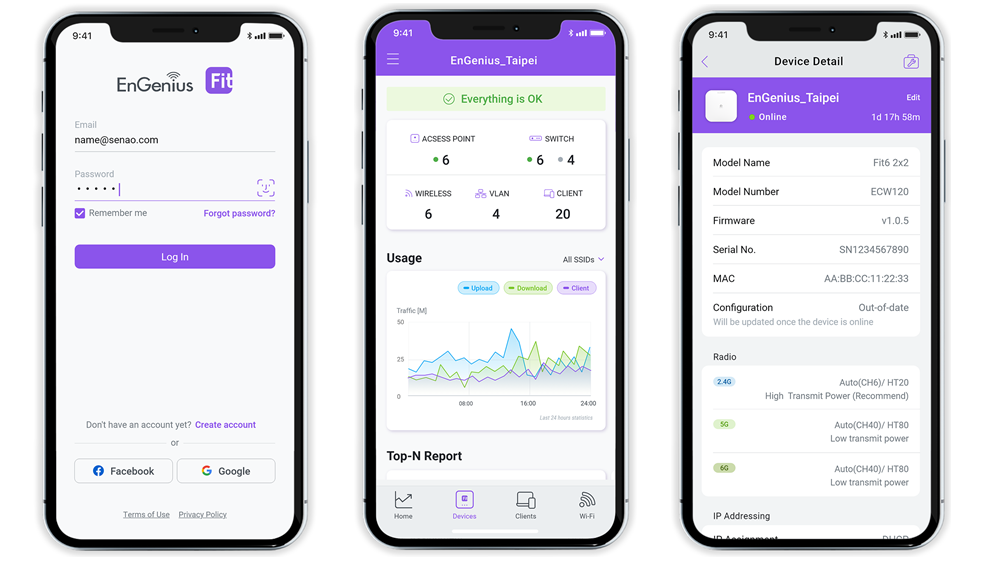
1. Open the **FitXpress** mobile app and create an account.
2. Login and go to the **Devices** section. Click the **Add(+)** button.
3. Scan the QR code on the back of the device via the app.

4\. If the camera successfully scans the QR code, the app will display the device information. You can tap "**Register**" to complete the registration.
### Step 3: Connect to FitXpress
Once the device is powered on and ready to connect to the Internet, the **PWR LED** will stay *Solid On*, which means the device is now connected to the **FitXpress** platform. It will automatically download the default configuration settings from FitXpress for automated provisioning.
{% hint style="warning" %}
When the Access Point is connected to the **FitXpress** Platform for the first time, it will automatically check the latest firmware version available. If a **firmware upgrade** is required, it might take **8\~10 minutes** to complete the process. All LED indicators will be *Flashing (0.5 sec)* till the process is finished.
{% endhint %}
### **Step 4: Manage with the FitXpress**
Log in to the **FitXpress app** to configure detailed settings and monitor your devices.
## **Option B: On-premises Management with FitController**
### Step 1: Connecting Ethernet
Connect the Ethernet cable from the EnGenius Fit AP directly to the DHCP-enabled network, which is the same Layer-2 network as **FitController**.
### Step 2: Log in to the FitController
Launch your web browser to access the login page of **FitController** and create an account. Enter the email address and password that you created and click Sign In.
{% hint style="info" %}
The FitController default IP address in DHCP client mode will get an IP address from the DHCP server. If FitController cannot get an IP address from the DHCP server, the default IP address will be **192.168.1.250:8080.**
{% endhint %}
### Step 3: Register Device and Assign to Network
1. Go to the ***System > Inventory*** page and click "**Register Device (+)**".
2. FitController will list all EnGenius Fit devices discovered from the same L2 network in the **Pending Approval** section. Select the device and Click "**Register**" to add to inventory.
3. From the **Inventory** page, Select the newly added device and click "**Assign to Network**" to add the device to your personalized network.
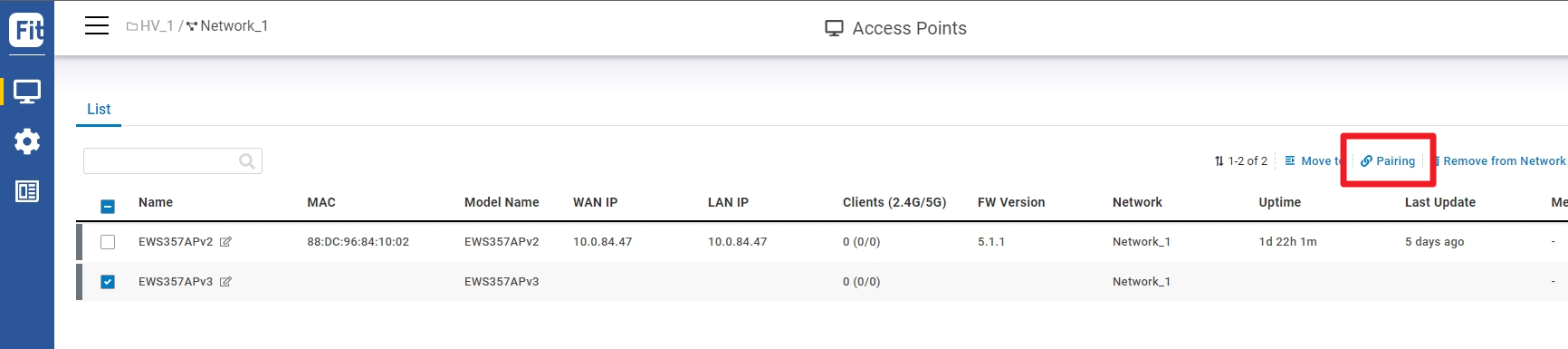
### **Step 4: Pairing the Device**
1. Go to access point **Device List.**
2. Select the newly added device and click "**Pairing**" to allow the access point to build an encrypted connection between the device and FitController.
### **Step 5: Manage with FitController**
Navigate to the left side menu to configure & manage your network and view network statistics using the FitController management interface.
{% hint style="info" %}
For information on configuring and using the **FitController**, refer to the User Guide: [http://docs.engenius.ai/user-manual-FitController](https://docs.engenius.ai/fitcontroller-user-manual/)
{% endhint %}
## **Option C: Standalone Configuration**
### Step 1: Access to Local Web
1. Use your client device (e.g., a laptop, mobile device, or tablet) to find the SSID: "**EnMGMTxxxx**" and connect to it.
{% hint style="info" %}
**EnMGMTxxxx -** xxxx is the last four digits of MAC - **MAC** can be found on the device label on the back of the access point.
{% endhint %}
2\. Under your web browser, enter the URL: [**http://EnGenius.local**](http://engenius.local/) or **** to access the device's user interface.
3\. Use the default login credential (ID/PWD: **admin/admin**) to log in to the device's local web page.
### Step2: Configure and Manage the Device
After logging into the device's local web page, navigate to the left side menu to configure and manage the AP accordingly.
{% hint style="info" %}
For information on configuring and using the **Standalone Configuration**, refer to the User Guide: [http://docs.engenius.ai/user-manual-FitController](https://docs.engenius.ai/fitcontroller-user-manual/)
{% endhint %}
{% hint style="warning" %}
#### **How to Change Management Mode?**
EnGenius Fit devices support versatile network management methods, but the device can only be managed under one management mode at a time - either **FitXpress**, **FitController**, or **Standalone**. Therefore, you need to **reset the device** before changing to a different management mode. Then follow QSG instructions for the device onboarding.
{% endhint %}
---
# Agent Instructions
This documentation is published with GitBook. GitBook is the documentation platform designed so that both humans and AI agents can read, navigate, and reason over technical content effectively. Learn more at gitbook.com.
## Querying This Documentation
If you need additional information that is not directly available in this page, you can query the documentation dynamically by asking a question.
Perform an HTTP GET request on the current page URL with the `ask` query parameter, and the optional `goal` query parameter:
```
GET https://doc.engenius.ai/home-engenius-qsg-library/engenius-fit-qsg/fit-access-point/ews276-fit.md?ask=&goal=
```
`ask` is the immediate question: it should be specific, self-contained, and written in natural language.
`goal` is optional and describes the broader end goal you are ultimately trying to accomplish on behalf of the user. GitBook uses it to tailor the answer towards what is most useful for that goal.
The response will contain a direct answer to the question and relevant excerpts and sources from the documentation.
Use this mechanism when the answer is not explicitly present in the current page, you need clarification or additional context, or you want to retrieve related documentation sections.