> For the complete documentation index, see [llms.txt](https://doc.engenius.ai/llms.txt). Markdown versions of documentation pages are available by appending `.md` to page URLs; this page is available as [Markdown](https://doc.engenius.ai/home-eoc655-user-manual/initial-setup-and-configuration/professional-antenna-installation.md).
# Professional Antenna Installation
## Installation Notice
This product is engineered for specialized applications and must only be installed by a professional with expertise in RF technology and compliance regulations. Installing or adjusting settings by unqualified individuals is strongly discouraged to ensure safety and proper operation.
For detailed RF testing data and applicable regulatory power limitations, refer to the documentation associated with \*\***FCC-ID: A8J**
## Installation Location Requirements
To comply with regulatory RF exposure guidelines, the product must be installed so that the radiating antenna is at least 250cm away from any person during normal operating conditions.
## Certified Antennas Compliance
Ensure the use of only certified antennas as listed under the *Certified Antennas* section. Utilizing non-approved antennas can result in the emission of spurious signals or surpassing the FCC's acceptable RF transmission levels. Such usage is strictly prohibited to prevent regulatory violations.
{% hint style="danger" %} **Warning**
**FCC Compliance for Outdoor Antenna Kits**
When installing outdoor antenna kits in the United States, or in any area where FCC regulations apply, it is crucial to adhere to the following guidelines to ensure compliance with FCC rules:
* **Antenna Certification**: Only use antennas that are certified with the product. The Federal Communications Commission (FCC) explicitly prohibits the use of any antenna not certified with the product, as stated in 47 CFR part 15.204.
* **Transmit Power Settings**: Installers and grantees must configure the radio's transmit (Tx) power settings according to the product's certified values. Deviating from these certified Tx power values is strictly prohibited by FCC rules outlined in 47 CFR part 15.204.
* **Maximum EIRP Limit**: The FCC imposes a restriction on the total power output, defined by the Maximum Effective Isotropic Radiated Power (EIRP) limit. This limit necessitates adjustment of the radio power to remain within the allowed maximum EIRP, ensuring compliance with FCC regulations.
* **Installation Precautions**: Select the installation location carefully, ensuring that the final output power does not surpass the established EIRP limit. Non-compliance with these regulations can result in severe federal penalties.
Adhering to these guidelines ensures compliance with FCC regulations, promoting safe and legal operation of outdoor antenna kits.
{% endhint %}
## Outdoor Installation of EnGenius EOC655 Series Products
The EnGenius EOC655 Series offers versatile mounting options for outdoor radios to ensure optimal performance and durability in various settings.
**Wall Mount**
A wall mount kit is available for those who prefer to install their radios on the side of a building or any structure. This method ensures there are no obstructions interfering with the radio antenna, allowing for clear, reliable communication.
**Pole/Tower Mount**
For installations requiring elevation or attachment to round surfaces, the radio installation kit comes equipped with two metal hose clamps. These clamps are designed to accommodate pole or tower diameters ranging from 30mm to 60mm, providing a secure fit for various installations.
Choosing the appropriate mounting method is crucial for maximizing radio performance and longevity.
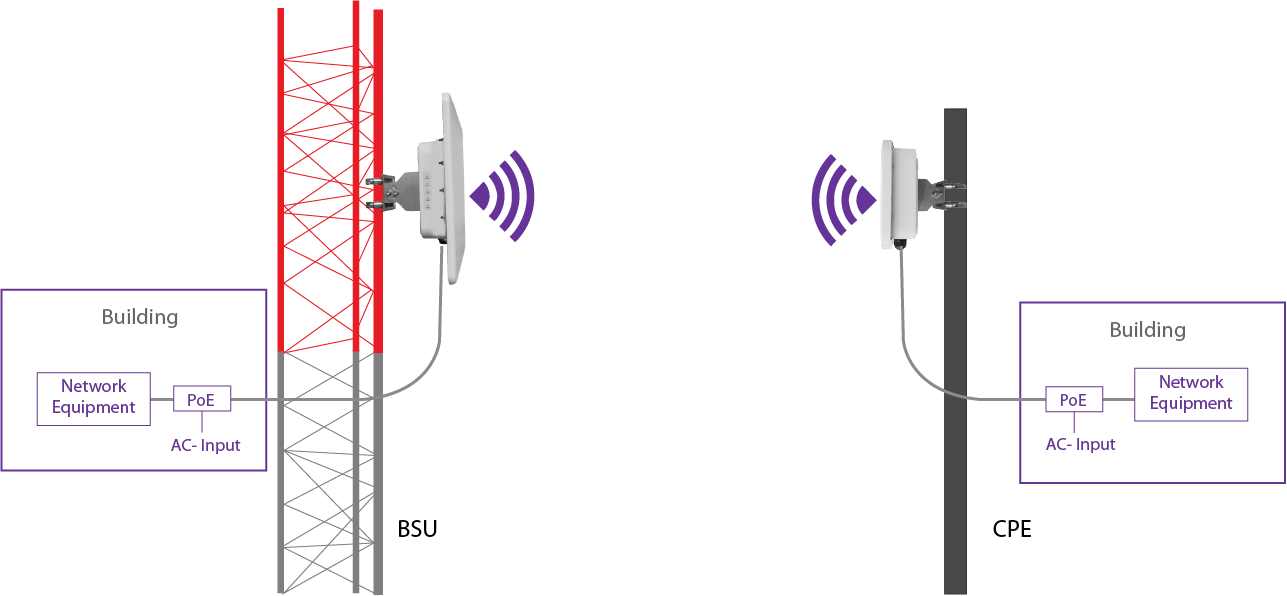
Typical Deployment
---
# Agent Instructions
This documentation is published with GitBook. GitBook is the documentation platform designed so that both humans and AI agents can read, navigate, and reason over technical content effectively. Learn more at gitbook.com.
## Querying This Documentation
If you need additional information that is not directly available in this page, you can query the documentation by asking a question.
Perform an HTTP GET request on the following URL with the `ask` and `goal` query parameters:
```
GET https://doc.engenius.ai/home-eoc655-user-manual/initial-setup-and-configuration/professional-antenna-installation.md?ask=&goal=
```
`ask` is the immediate question: it should be specific, self-contained, and written in natural language.
`goal` is what the user is ultimately trying to achieve, the reason they need the answer. Sharing it helps GitBook give you a better, more relevant answer. A goal is most helpful when it describes the outcome the user wants rather than restating the question. For example, with `ask=how do I create an API token`, a goal like `automate deployments from our CI pipeline` lets GitBook tailor the answer to that use case.
The response will contain a direct answer to the question and relevant excerpts and sources from the documentation.
Use this mechanism when the answer is not explicitly present in the current page, you need clarification or additional context, or you want to retrieve related documentation sections.