> For the complete documentation index, see [llms.txt](https://doc.engenius.ai/llms.txt). Markdown versions of documentation pages are available by appending `.md` to page URLs; this page is available as [Markdown](https://doc.engenius.ai/home-epc-datasheet/administration-and-management.md).
# Administration and Management
## Multi-Tenancy Support
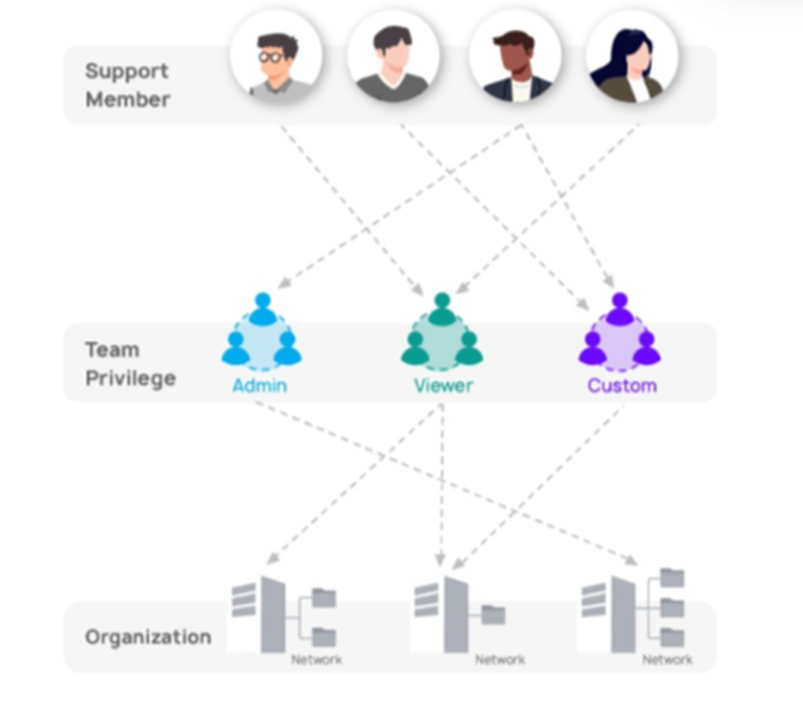
Manage multiple sites, stores, or business units from a single EPC interface while keeping each organization’s settings completely independent. Departments or clients can be isolated through separate policies and resource pools, making EPC ideal for service providers or enterprises with distinct internal divisions.
## Scalable Management — Up to 3,000 Devices per EPC
EPC delivers a scalable architecture that grows with your organization. This scalability extends across distributed networks, enabling consistent management practices and unified policies across diverse environments—whether across regions or between business units.
## Integration with EnGenius Cloud
The EPC platform’s integration with EnGenius Cloud provides real-time synchronization of settings and centralized control across all network environments. This hybrid approach provides flexibility in network design and management, accommodating various network architectures within a single management framework.
* EnGenius Cloud users can access EPC from the EnGenius Cloud Interface.
* Connects with EnGenius Cloud for pro-features and license management.
* Enables backup and redundancy options through cloud integration.
## Remote Management
Administrators can monitor, configure, and troubleshoot devices from anywhere through EPC’s secure web interface, minimizing the need for on-site visits and accelerating issue resolution.
## Failover Protection
EPC ensures business continuity through EnGenius Cloud (EC) and FitRegister integration for essential backups. This built-in failover capability secures license keys and device registrations, providing a safeguard that enables rapid recovery and uninterrupted operations in the event of a disruption.
---
# Agent Instructions
This documentation is published with GitBook. GitBook is the documentation platform designed so that both humans and AI agents can read, navigate, and reason over technical content effectively. Learn more at gitbook.com.
## Querying This Documentation
If you need additional information that is not directly available in this page, you can query the documentation by asking a question.
Perform an HTTP GET request on the following URL with the `ask` and `goal` query parameters:
```
GET https://doc.engenius.ai/home-epc-datasheet/administration-and-management.md?ask=&goal=
```
`ask` is the immediate question: it should be specific, self-contained, and written in natural language.
`goal` is what the user is ultimately trying to achieve, the reason they need the answer. Sharing it helps GitBook give you a better, more relevant answer. A goal is most helpful when it describes the outcome the user wants rather than restating the question. For example, with `ask=how do I create an API token`, a goal like `automate deployments from our CI pipeline` lets GitBook tailor the answer to that use case.
The response will contain a direct answer to the question and relevant excerpts and sources from the documentation.
Use this mechanism when the answer is not explicitly present in the current page, you need clarification or additional context, or you want to retrieve related documentation sections.