> For the complete documentation index, see [llms.txt](https://doc.engenius.ai/llms.txt). Markdown versions of documentation pages are available by appending `.md` to page URLs; this page is available as [Markdown](https://doc.engenius.ai/home-engenius-qsg-library/jp/engenius-cloud-qsg-jp/cloud-switch/jp-ecs1552-qsg.md).
# \[JP] ECS1552 QSG
クラウド管理型48ポートのギガビットスイッチ、4つのSFP+ポート
## 導入
本クイックスタートガイドは、**CloudSwitch L2Plus 48**(型番:**ECS1552**)の設置手順を案内することを目的としており、ハードウェアの取り付けおよび設定方法が含まれています。
{% hint style="info" %}
## CloudSwitch L2Plus 48
### クラウド管理対応48ポートのギガビットスイッチと4つのSFP+ポート
#### 型番**:** ECS1552
* 高速接続用の48 x 1G ポート。
* 4つの10G SFP+アップリンクポート、帯域幅集約型アプリケーション向け。
{% endhint %}
コンテンツクイックリンク
[**ハードウェアのインストール**](broken://pages/WaZ7EVaIo9SIjnwDkbnW)
[**管理プレーン**](broken://pages/HWX9RKdtjlXvMzxXxvoS)
[**オプションA:クラウド管理**](broken://pages/y5Tghwcd1iZCQ9XPYuNO)
[**オプションB:スタンドアロン構成**](broken://pages/0ol7u1i5D9sjTL46C219)
## パッケージの内容


## システム要件
### Webブラウザ:
* Google Chrome (57.0.2987.110 以降)
* Microsoft Edge (80.0.361.103 以降)
* Mozilla Firefox (52.0 以降)
## ハードウェア概要
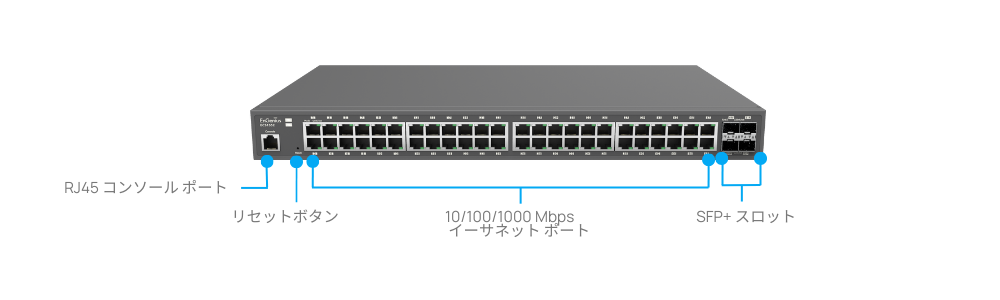
### フロントパネル - ポートとボタン
{% hint style="info" %}
* **デフォルトにリセットする**には、**10 秒**以上押し続け、すべてのポートの LEDが消灯および点灯します。その後、デバイスは工場出荷時のデフォル ト設定にリセットされます。
{% endhint %}
### フロントパネル - システム&ポートLED


---
# Agent Instructions
This documentation is published with GitBook. GitBook is the documentation platform designed so that both humans and AI agents can read, navigate, and reason over technical content effectively. Learn more at gitbook.com.
## Querying This Documentation
If you need additional information that is not directly available in this page, you can query the documentation by asking a question.
Perform an HTTP GET request on the following URL with the `ask` and `goal` query parameters:
```
GET https://doc.engenius.ai/home-engenius-qsg-library/jp/engenius-cloud-qsg-jp/cloud-switch/jp-ecs1552-qsg.md?ask=&goal=
```
`ask` is the immediate question: it should be specific, self-contained, and written in natural language.
`goal` is what the user is ultimately trying to achieve, the reason they need the answer. Sharing it helps GitBook give you a better, more relevant answer. A goal is most helpful when it describes the outcome the user wants rather than restating the question. For example, with `ask=how do I create an API token`, a goal like `automate deployments from our CI pipeline` lets GitBook tailor the answer to that use case.
The response will contain a direct answer to the question and relevant excerpts and sources from the documentation.
Use this mechanism when the answer is not explicitly present in the current page, you need clarification or additional context, or you want to retrieve related documentation sections.