> For the complete documentation index, see [llms.txt](https://doc.engenius.ai/llms.txt). Markdown versions of documentation pages are available by appending `.md` to page URLs; this page is available as [Markdown](https://doc.engenius.ai/s21-user-guide/getting-started/about-this-guide.md).
# About This Guide
## Overview
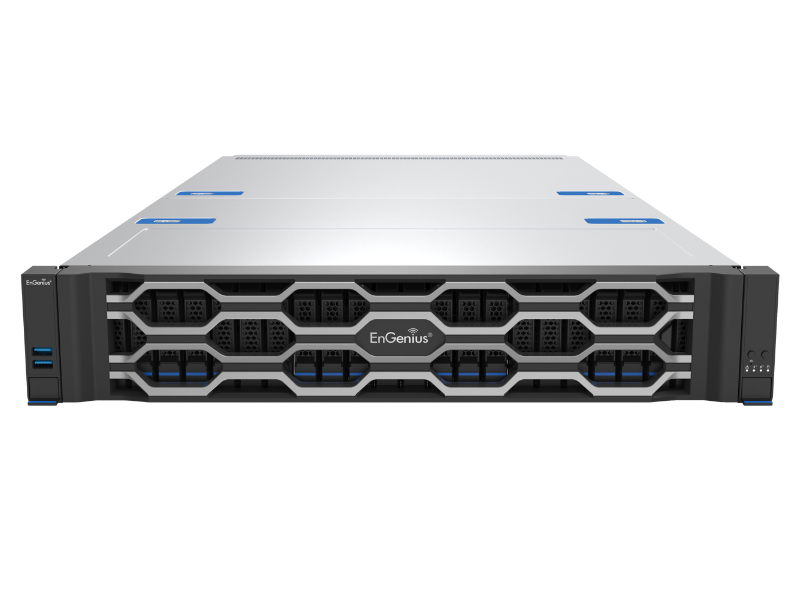
Welcome to the EnGenius S21 AI Server User Guide. This is more than just a specification sheet; it's your hands-on partner in the data center. Our goal is to help you seamlessly translate your existing IT knowledge into the practical skills needed to handle and manage server hardware.
### **Who this guide is for**
This guide is written for IT professionals and technicians who are familiar with basic concepts like networking and operating systems but may lack hands-on experience with server hardware. We assume you know what a CPU or RAM is, so we focus on:
* Clear, actionable procedures.
* Industry best practices and pro tips.
* How to prevent common mistakes and potential risks.
### **What you'll learn**
This guide will teach you how to confidently deploy an enterprise-grade server from start to finish. It covers everything from safely unboxing the server and installing core components to configuring the BIOS, installing an operating system, and using the BMC for powerful remote management.
### How This Guide is Organized
To help you find the information you need quickly, this guide is divided into four main parts:
#### :notebook\_with\_decorative\_cover: Part 1: Getting Started
This part walks you through all the initial setup tasks. It covers the unboxing inspection, critical safety precautions, environmental planning, and the complete process for securely mounting the server in a rack.
{% content-ref url="/pages/WOCnvGDL1kNPmZbQIxuU" %}
[Before you begin](/s21-user-guide/getting-started/before-you-begin.md)
{% endcontent-ref %}
{% content-ref url="/pages/Mjvy0atb0NX2W98I9Rlj" %}
[Rack Installation](/s21-user-guide/getting-started/rack-installation.md)
{% endcontent-ref %}
#### :notebook\_with\_decorative\_cover: Part 2: Core Component Installation
This is the heart of the hardware installation. We'll dive into how to work safely inside the chassis and provide detailed instructions for installing key components like processors, memory, storage drives, and expansion cards.
{% content-ref url="/pages/HY7hIpPr4uMOzTqSCIWR" %}
[Working Inside the Server](/s21-user-guide/core-component-installation/working-inside-the-server.md)
{% endcontent-ref %}
{% content-ref url="/pages/N6wbqMRfAcUPxkEdLlXK" %}
[Installing a CPU and Heatsink](/s21-user-guide/core-component-installation/installing-a-cpu-and-heatsink.md)
{% endcontent-ref %}
{% content-ref url="/pages/djPBkT3JBL8x5Ztd0Zx0" %}
[Installing Memory (DIMMs)](/s21-user-guide/core-component-installation/installing-memory-dimms.md)
{% endcontent-ref %}
{% content-ref url="/pages/WdX9q7mVIEu7HR87nNua" %}
[Installing Storage Drives](/s21-user-guide/core-component-installation/installing-storage-drives.md)
{% endcontent-ref %}
{% content-ref url="/pages/T6nhpJaD8IWFQ5gq47fp" %}
[Installing Expansion Cards](/s21-user-guide/core-component-installation/installing-expansion-cards.md)
{% endcontent-ref %}
#### :notebook\_with\_decorative\_cover: Part 3: Software and Remote Management
Once the hardware is ready, this part guides you through the software configuration. You'll learn how to set up the BIOS, install an operating system, and leverage the Baseboard Management Controller (BMC) for powerful remote monitoring and control.
{% content-ref url="/pages/xpXgGoD7NtXgcIfzDuvI" %}
[Configuring the BIOS](/s21-user-guide/software-and-remote-management/configuring-the-bios.md)
{% endcontent-ref %}
{% content-ref url="/pages/iCer8eb1mmftX2nbHare" %}
[Installing an Operating System](/s21-user-guide/software-and-remote-management/installing-an-operating-system.md)
{% endcontent-ref %}
{% content-ref url="/pages/evYxVFiFHyBKWuFPkd15" %}
[Configuring the Remote Management (BMC)](/s21-user-guide/software-and-remote-management/configuring-the-remote-management-bmc.md)
{% endcontent-ref %}
{% content-ref url="/pages/V5CmHdbHipl5gNpd99lX" %}
[Updating Firmware (BIOS & BMC)](/s21-user-guide/software-and-remote-management/updating-firmware-bios-and-bmc.md)
{% endcontent-ref %}
#### :notebook\_with\_decorative\_cover: Part 4: Reference
When you encounter an issue or need to look up a specific detail, this is your go-to section. It provides troubleshooting guides for common problems, detailed technical specifications, I/O port diagrams, and information on how to get help when you need it.
We recommend you start with Part 1, especially the **Safety precautions** section, to ensure you perform all operations in a safe environment.
{% content-ref url="/pages/npjCAUsEJZubVnbNqNsH" %}
[Basic Troubleshooting](/s21-user-guide/reference/basic-troubleshooting.md)
{% endcontent-ref %}
{% content-ref url="/pages/K1kaUFnUoT08bKlcqXfI" %}
[I/O Port Layout](/s21-user-guide/reference/i-o-port-layout.md)
{% endcontent-ref %}
---
# Agent Instructions
This documentation is published with GitBook. GitBook is the documentation platform designed so that both humans and AI agents can read, navigate, and reason over technical content effectively. Learn more at gitbook.com.
## Querying This Documentation
If you need additional information that is not directly available in this page, you can query the documentation by asking a question.
Perform an HTTP GET request on the following URL with the `ask` and `goal` query parameters:
```
GET https://doc.engenius.ai/s21-user-guide/getting-started/about-this-guide.md?ask=&goal=
```
`ask` is the immediate question: it should be specific, self-contained, and written in natural language.
`goal` is what the user is ultimately trying to achieve, the reason they need the answer. Sharing it helps GitBook give you a better, more relevant answer. A goal is most helpful when it describes the outcome the user wants rather than restating the question. For example, with `ask=how do I create an API token`, a goal like `automate deployments from our CI pipeline` lets GitBook tailor the answer to that use case.
The response will contain a direct answer to the question and relevant excerpts and sources from the documentation.
Use this mechanism when the answer is not explicitly present in the current page, you need clarification or additional context, or you want to retrieve related documentation sections.