> For the complete documentation index, see [llms.txt](https://doc.engenius.ai/llms.txt). Markdown versions of documentation pages are available by appending `.md` to page URLs; this page is available as [Markdown](https://doc.engenius.ai/intel-r-vroc-for-linux-guide/vroc-installation/introduction.md).

# Introduction

### 1.1 Supported RAID Volumes

Intel VROC supports the following RAID levels in Linux:

* RAID 0 (Striping) – Maximum performance, no redundancy.
* RAID 1 (Mirroring) – Data redundancy with two drives.
* RAID 5 (Striping with Parity) – Balanced performance, capacity, and redundancy.
* RAID 10 (Mirroring + Striping) – Best combination of performance and fault tolerance.
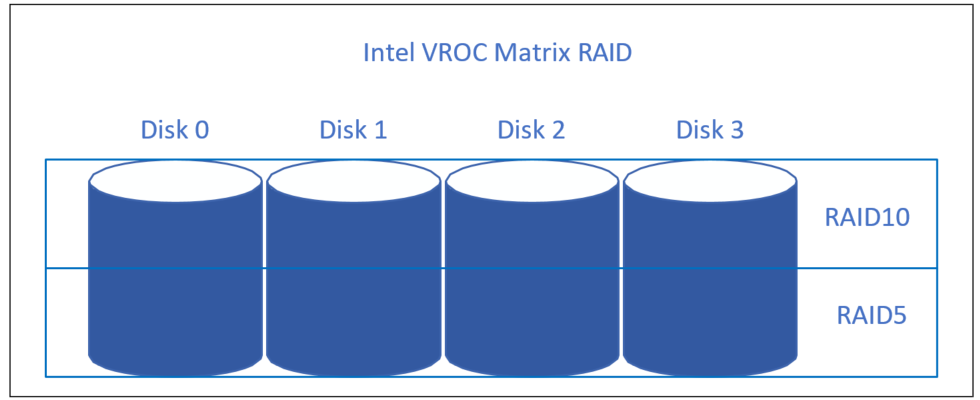
* Intel® Matrix RAID – Two RAID volumes within one container, supporting mixed RAID levels.

{% hint style="info" %}
**Best Practice:** Always back up critical data before creating or modifying RAID volumes. RAID improves reliability but does not replace backups.
{% endhint %}

#### RAID 0 (Striping)

Distributes data across two or more drives for maximum throughput.

* Advantage: Best performance
* Drives supported: Minimum 2
* Fault tolerance: None — one failed drive causes complete data loss
* Application: Temporary or high I/O workloads (scratch space, testing)

{% hint style="danger" %}
**Common Mistake:** Using RAID 0 for critical data storage. Limit to workloads where data can be recreated easily.
{% endhint %}

#### RAID 1 (Mirroring)

Duplicates data across two drives in real time.

* Advantage: High availability
* Drives supported: Maximum 2
* Fault tolerance: Excellent — system remains operational if one drive fails
* Application: Small systems needing simple redundancy

#### RAID 5 (Striping with Parity)

Stripes both data and parity across three or more drives.

* Advantage: Balance of performance, capacity, and redundancy
* Drives supported: Minimum 3
* Fault tolerance: Recovers from one drive failure
* Application: Large data storage where redundancy and capacity matter

#### RAID 10 (Mirrored Striping)

Combines striping and mirroring across four or more drives.

* Advantage: High performance and reliability
* Drives supported: Minimum 4
* Fault tolerance: Survives up to two drive failures (one per mirrored pair)
* Application: High-performance workloads such as video editing or analytics

#### Intel® Matrix RAID

Allows creation of two RAID volumes in one container, mixing RAID 0, 1, 5, or 10.

* Advantage: Maximizes disk usage by combining performance and redundancy profiles
* Drives supported: Multiple, depending on chosen RAID levels
* Fault tolerance: Based on selected RAID configuration
* Application: Mixed environments needing both performance and protection

{% hint style="success" %}
**Pro Tip:** Matrix RAID is ideal when you need different redundancy levels on the same set of drives.
{% endhint %}

<figure><img src="https://1753529209-files.gitbook.io/~/files/v0/b/gitbook-x-prod.appspot.com/o/spaces%2FbNwztk6PmLtEwxQxFPWx%2Fuploads%2FJXKPq1pIYmWwYG4buG0l%2Funknown.png?alt=media&amp;token=f5139fc1-0c35-4148-b76f-262c3e9286f9" alt=""><figcaption></figcaption></figure>

#### Supported Linux\* OS distributions

Intel VROC Linux drivers and tools are open source. Most major distributions (RHEL, SUSE, Ubuntu) include inbox kernel support. In some cases, Intel provides out-of-box (OOB) update packages for newer Xeon platforms or older distributions.

* Inbox support: Kernel drivers already bundled with the OS.
* Out-of-box package: Provided by Intel, usually as RPMs or ISOs, when inbox drivers are insufficient.

{% hint style="danger" %}
**Common Mistake:** Mixing inbox and out-of-box drivers can cause conflicts. Always confirm which type your OS requires before installation.
{% endhint %}

### 1.2 Core Terminology

This guide consistently uses the following terms:

<table data-header-hidden><thead><tr><th width="178" valign="bottom"></th><th></th></tr></thead><tbody><tr><td valign="bottom"><mark style="color:blue;"><strong>Term</strong></mark></td><td><mark style="color:blue;"><strong>Definition</strong></mark></td></tr><tr><td valign="bottom">API</td><td>Application Programming Interface.</td></tr><tr><td valign="bottom">BIOS</td><td>Basic Input/Output System.</td></tr><tr><td valign="bottom">Array</td><td>An mdadm container required for Intel® metadata-based volumes using the IMSM option during volume creation.</td></tr><tr><td valign="bottom">Container</td><td>A type of array used with Intel® metadata or other non-native metadata.</td></tr><tr><td valign="bottom">GB</td><td>Gigabyte.</td></tr><tr><td valign="bottom">GiB</td><td>Gibibyte (1024 × 1024 × 1024 bytes).</td></tr><tr><td valign="bottom">GA</td><td>General Access – OS release package validated by Red Hat Linux*.</td></tr><tr><td valign="bottom">HII</td><td>Human Interface Infrastructure.</td></tr><tr><td valign="bottom">Hot-Plug</td><td>Removing or inserting a drive while the system is powered on.</td></tr><tr><td valign="bottom">I/O</td><td>Input/Output.</td></tr><tr><td valign="bottom">Initramfs</td><td>Initial RAM File System.</td></tr><tr><td valign="bottom">IMSM</td><td>Intel® Matrix Storage Manager metadata format.</td></tr><tr><td valign="bottom">KB</td><td>Kilobyte.</td></tr><tr><td valign="bottom">KiB</td><td>Kibibyte (1024 bytes).</td></tr><tr><td valign="bottom">Left-Symmetric</td><td>Default RAID 5 layout scheme. Not supported with IMSM metadata.</td></tr><tr><td valign="bottom">Left-Asymmetric</td><td>Parity bit layout scheme used in RAID 5 configurations.</td></tr><tr><td valign="bottom">Matrix RAID</td><td>Two different RAID volumes within a single RAID array container.</td></tr><tr><td valign="bottom">MB</td><td>Megabyte.</td></tr><tr><td valign="bottom">MiB</td><td>Mebibyte (1024 × 1024 bytes).</td></tr><tr><td valign="bottom">MD</td><td>Linux* kernel Multiple Device driver.</td></tr><tr><td valign="bottom">Member</td><td>NVMe drive used within a RAID array.</td></tr><tr><td valign="bottom">mdadm</td><td>Linux* utility for managing software RAID. Licensed under GPL v2 or later, supports NVMe SSDs.</td></tr><tr><td valign="bottom">NVMe</td><td>Non-volatile Memory Express.</td></tr><tr><td valign="bottom">OS</td><td>Operating System.</td></tr><tr><td valign="bottom">OSV</td><td>Operating System Vendor (e.g., Red Hat, SUSE).</td></tr><tr><td valign="bottom">Pre-OS</td><td>A BIOS component to configure Intel® VROC RAID.</td></tr><tr><td valign="bottom">RAID</td><td>Redundant Array of Independent Disks. Distributes data across multiple drives to provide redundancy or improve performance.</td></tr><tr><td valign="bottom">RAID 0 (striping)</td><td>Stripes data across the array’s members. Improves read/write performance but provides no redundancy.</td></tr><tr><td valign="bottom">RAID 1 (mirroring)</td><td>Mirrors data across array members. Provides redundancy and fault tolerance by duplicating data on two drives.</td></tr></tbody></table>

{% hint style="danger" %}
**Common Mistake:** Confusing “array” and “volume.” An array refers to the underlying container, while a volume is the logical storage unit presented to the OS.
{% endhint %}


---

# Agent Instructions
This documentation is published with GitBook. GitBook is the documentation platform designed so that both humans and AI agents can read, navigate, and reason over technical content effectively. Learn more at gitbook.com.

## Querying This Documentation
If you need additional information that is not directly available in this page, you can query the documentation by asking a question.

Perform an HTTP GET request on the following URL with the `ask` and `goal` query parameters:

```
GET https://doc.engenius.ai/intel-r-vroc-for-linux-guide/vroc-installation/introduction.md?ask=<question>&goal=<user_goal>
```

`ask` is the immediate question: it should be specific, self-contained, and written in natural language.
`goal` is what the user is ultimately trying to achieve, the reason they need the answer. Sharing it helps GitBook give you a better, more relevant answer. A goal is most helpful when it describes the outcome the user wants rather than restating the question. For example, with `ask=how do I create an API token`, a goal like `automate deployments from our CI pipeline` lets GitBook tailor the answer to that use case.

The response will contain a direct answer to the question and relevant excerpts and sources from the documentation.

Use this mechanism when the answer is not explicitly present in the current page, you need clarification or additional context, or you want to retrieve related documentation sections.