> For the complete documentation index, see [llms.txt](https://doc.engenius.ai/llms.txt). Markdown versions of documentation pages are available by appending `.md` to page URLs; this page is available as [Markdown](https://doc.engenius.ai/s11-user-guide/core-component-installation/working-inside-the-server.md).

# Working Inside the Server

This chapter shows you how to open the server chassis and explains the essential safety guidelines for handling internal components.

## **Opening the chassis**

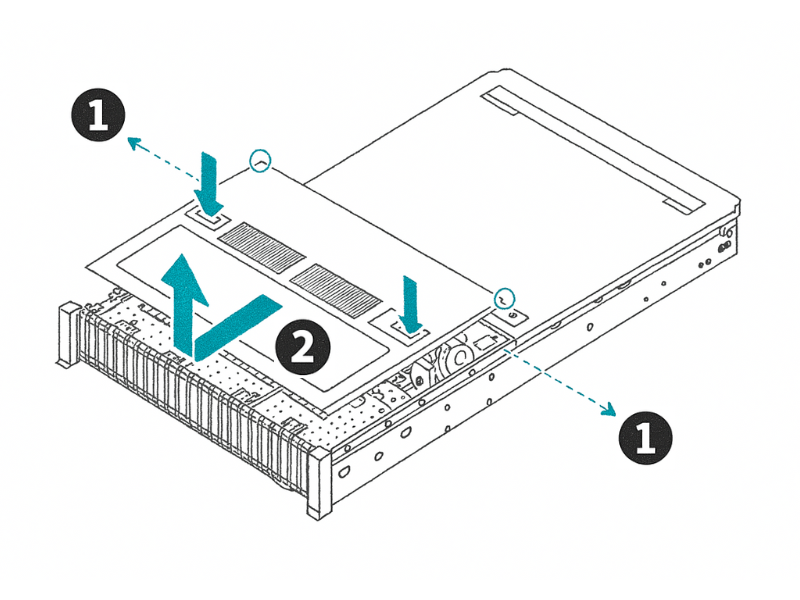
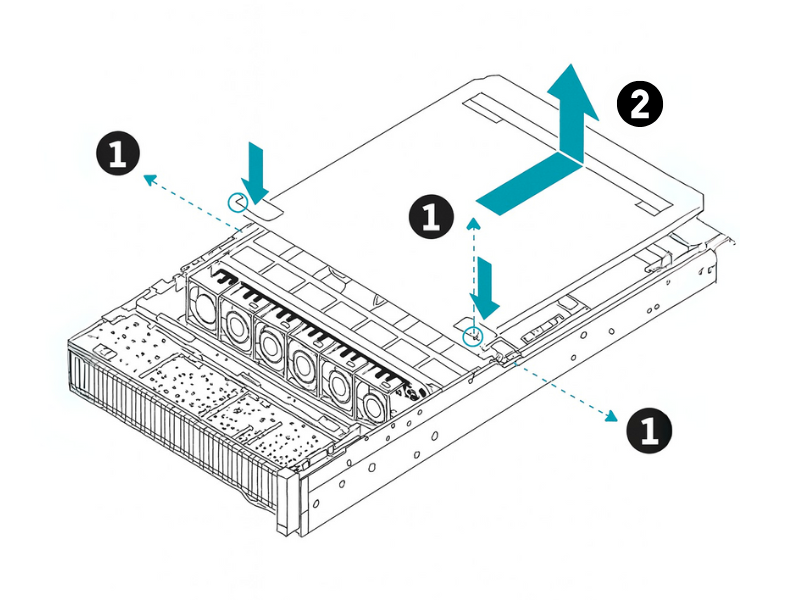
Before you can install or replace any internal components, you'll need to remove the top cover. Make sure you have already shut down the server and disconnected all power and network cables.

## **To remove the top cover:**

1. Unscrew the captive screws on the top of the chassis that hold the cover in place.
2. Slide the cover toward the rear of the chassis until it stops.
3. Lift the cover straight up and away from the chassis. Place it aside on a safe, flat surface.

<figure><img src="https://content.gitbook.com/content/jpZbCL0qpDQTXK2bjgCk/blobs/F5oazIZHblEYhC77hm8H/3.2Accessing%20the%20System%20.png" alt=""><figcaption></figcaption></figure>

<figure><img src="https://content.gitbook.com/content/jpZbCL0qpDQTXK2bjgCk/blobs/iAMwGnqtJvQyiENPnXoF/3.2Accessing%20the%20System-Opening%20the%20Rear%20Cover%20V02.png" alt=""><figcaption></figcaption></figure>

{% hint style="success" %}
**Pro Tip:  Keep your screws organized**&#x20;

When you remove screws, it's a good practice to place them in a magnetic tray or a small container. This prevents them from getting lost and makes reassembly much easier.
{% endhint %}

## **Electrostatic discharge (ESD) safety guidelines**

Static electricity can instantly and permanently damage server components like processors, memory modules, and the motherboard itself. Following these guidelines is critical to prevent ESD damage.

* **Use an ESD wrist strap.** Before you touch anything inside the server, put on an ESD wrist strap and connect the clip to an unpainted metal surface on the server chassis or the rack. This is the most effective way to safely ground yourself.
* **Handle components by their edges.** Never touch the gold-plated connectors (the "fingers") or any of the integrated circuits on a component. Always hold cards, memory modules, and processors by their edges.
* **Keep components in anti-static bags.** Until you are ready to install a component, keep it inside its protective anti-static bag. When you remove an old component, place it immediately into an anti-static bag.

{% hint style="danger" %}
**Common Mistake: Working on carpet**&#x20;

Never work on a server in a carpeted area. Walking on carpet can generate a significant amount of static electricity. If possible, work on a hard, grounded floor and use an ESD mat on your workbench.
{% endhint %}

Here’s a quick summary of what to do and what to avoid:

<table data-header-hidden><thead><tr><th width="364.1796875"></th><th width="377.50390625"></th></tr></thead><tbody><tr><td><strong>Do</strong></td><td><strong>Don’t</strong></td></tr><tr><td>Wear an ESD wrist strap properly grounded.</td><td>Do not touch gold fingers, IC pins, or exposed circuitry with bare hands.</td></tr><tr><td>Store components in anti-static bags or foam.</td><td>Do not place electronic parts directly on metal or plastic surfaces.</td></tr><tr><td>Use humidifiers or ESD neutralizers in dry environments.</td><td>Do not work on carpeted surfaces.</td></tr><tr><td>Touch a grounded metal surface before handling components.</td><td>Do not replace parts while the system is powered on.</td></tr><tr><td>Use ESD-safe mats and tools.</td><td>Do not clean PCBs with cloth, paper, or sleeves.</td></tr><tr><td>Regularly inspect grounding equipment.</td><td>Do not wear an ungrounded wrist strap.</td></tr></tbody></table>


---

# Agent Instructions
This documentation is published with GitBook. GitBook is the documentation platform designed so that both humans and AI agents can read, navigate, and reason over technical content effectively. Learn more at gitbook.com.

## Querying This Documentation
If you need additional information that is not directly available in this page, you can query the documentation dynamically by asking a question.

Perform an HTTP GET request on the current page URL with the `ask` query parameter, and the optional `goal` query parameter:

```
GET https://doc.engenius.ai/s11-user-guide/core-component-installation/working-inside-the-server.md?ask=<question>&goal=<endgoal>
```

`ask` is the immediate question: it should be specific, self-contained, and written in natural language.
`goal` is optional and describes the broader end goal you are ultimately trying to accomplish on behalf of the user. GitBook uses it to tailor the answer towards what is most useful for that goal.

The response will contain a direct answer to the question and relevant excerpts and sources from the documentation.

Use this mechanism when the answer is not explicitly present in the current page, you need clarification or additional context, or you want to retrieve related documentation sections.