# I/O Port Layout

This chapter provides a detailed visual and descriptive reference for all external ports on the server, covering both the front and rear panels. Use this guide to quickly identify and understand the function of each connection point.

## **Front I/O ports**

* 2 × USB 3.0 Type-A ports
* 1 × Power button with integrated LED
* 1 × UID button with integrated LED
* 1 × Reset button
* 4 × Status LEDs (Fault, LAN, M.2, UID)

<figure><img src="/files/2BlEVV8BfZzU3naUdfkp" alt=""><figcaption></figcaption></figure>

<p align="center"><strong>System Front View</strong></p>

## **Rear I/O ports**

The rear I/O panel provides essential connectivity for external devices, management, and peripherals.

<figure><img src="/files/crZmOxdfVWTPDms2DQe2" alt=""><figcaption></figcaption></figure>

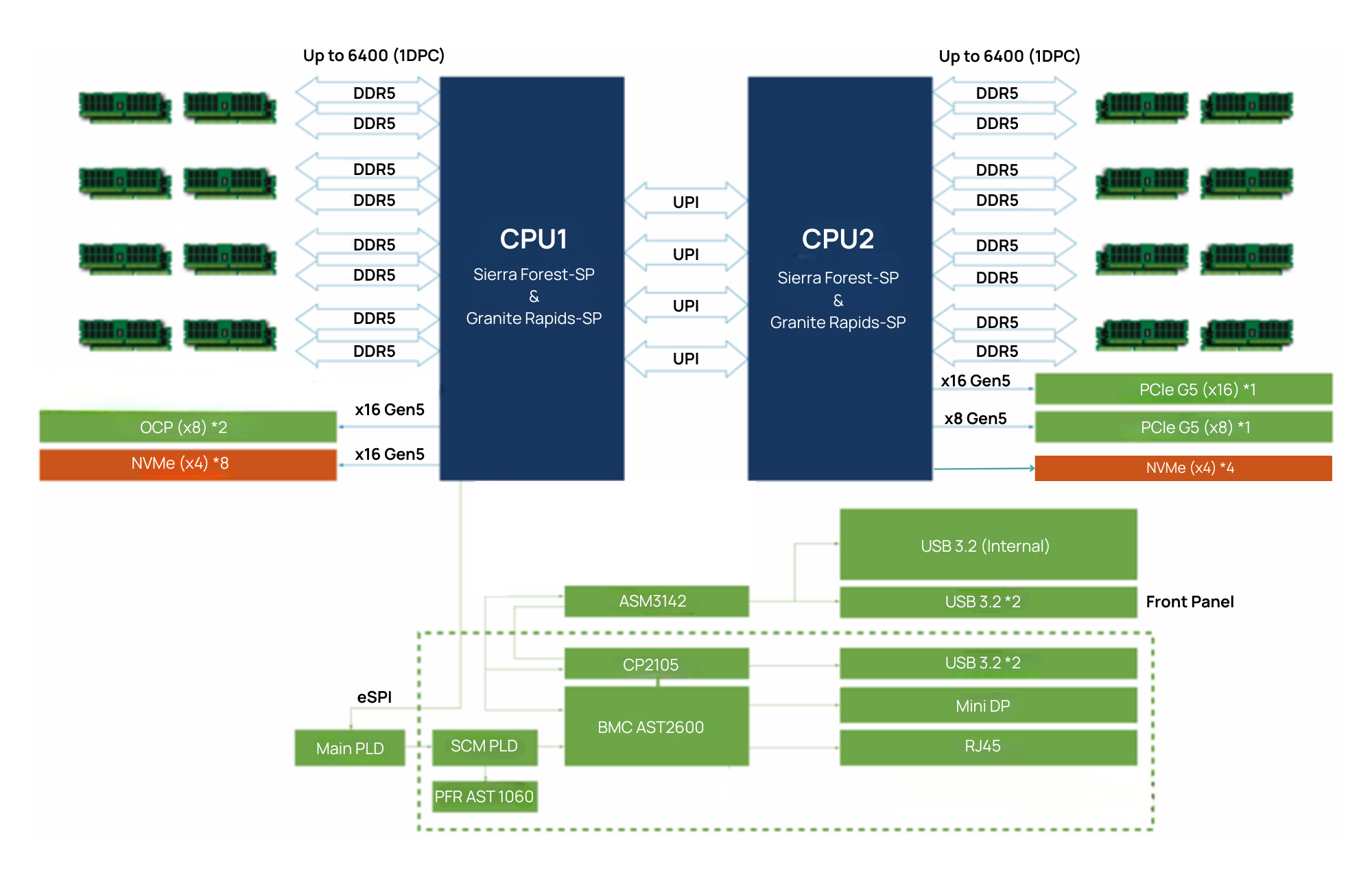
<table data-header-hidden><thead><tr><th width="205.3671875"></th><th width="94.3671875"></th><th width="151.82421875"></th><th></th></tr></thead><tbody><tr><td><strong>Port Name</strong></td><td><strong>Quantity</strong></td><td><strong>Interface Type</strong></td><td><strong>Description</strong></td></tr><tr><td>USB 3.0</td><td>1</td><td>Type-A</td><td>Rear panel ports for external devices.</td></tr><tr><td>Mini-Display Port</td><td>1</td><td>Mini-Display Port</td><td>BMC-controlled video output for a local console.</td></tr><tr><td>USB 3.0 Console</td><td>1</td><td>Type-A</td><td>For diagnostics or legacy console access.</td></tr><tr><td>RJ45 LAN (BMC/IPMI)</td><td>1</td><td>1GbE (dedicated)</td><td>Out-of-band management access via the AST2600 BMC.</td></tr><tr><td>OCP NIC 3.0 Slot</td><td>2</td><td>PCIe x8</td><td>For modular network interface cards.</td></tr><tr><td>PCIe 5.0 Slot</td><td>1</td><td>PCIe x8</td><td>For PCIe Card</td></tr><tr><td>PCIe 5.0 Slot</td><td>1</td><td>PCIe x16</td><td>For PCIe Card</td></tr></tbody></table>

## **Motherboard connectors and jumpers**

<figure><img src="/files/txKTOrTIizmveCMP747S" alt=""><figcaption></figcaption></figure>

<figure><img src="/files/xKRY9gfKQYTyQaZnZFfP" alt=""><figcaption></figcaption></figure>

This section identifies the key connectors and jumpers on the motherboard. Always refer to the silkscreen labels on the board itself for precise locations.

<figure><img src="/files/kAL88oH1kdmqGJIbb1JP" alt=""><figcaption></figcaption></figure>

####


---

# Agent Instructions: Querying This Documentation

If you need additional information that is not directly available in this page, you can query the documentation dynamically by asking a question.

Perform an HTTP GET request on the current page URL with the `ask` query parameter:

```
GET https://doc.engenius.ai/s11-user-guide/reference/i-o-port-layout.md?ask=<question>
```

The question should be specific, self-contained, and written in natural language.
The response will contain a direct answer to the question and relevant excerpts and sources from the documentation.

Use this mechanism when the answer is not explicitly present in the current page, you need clarification or additional context, or you want to retrieve related documentation sections.